

Building complex React user interfaces usually comes down to a trade-off: invest engineering months into custom solutions or integrate pre-built components. For intricate user flows, existing tools often save considerable development effort. Rather than constructing inline editing, drag-and-drop, or custom view handlers from scratch, developers can bind pre-tested components directly to their application state.
This choice becomes particularly evident when implementing data grids, interactive Gantt charts, or event calendars. These widgets demand tight feature integration, proper accessibility support, and stable performance under heavy data loads. Leveraging established components turns months of specialized development into a matter of hours.
That’s why we’ve built SVAR React, a suite of advanced UI components — so developers get required functionality out of the box.
Complex Components, Not Another UI Library
SVAR React offers pre-built, tested components tailored for complex application workflows, such as project planning, resource scheduling, or file management.
Unlike React UI libraries that provide developers with basic buttons and cards, SVAR React targets the high-effort UI structures that consume substantial maintenance and testing time. Every component ships with built-in state logic and feature sets, managed through native React APIs and CSS styling.
What Is Included in the Suite
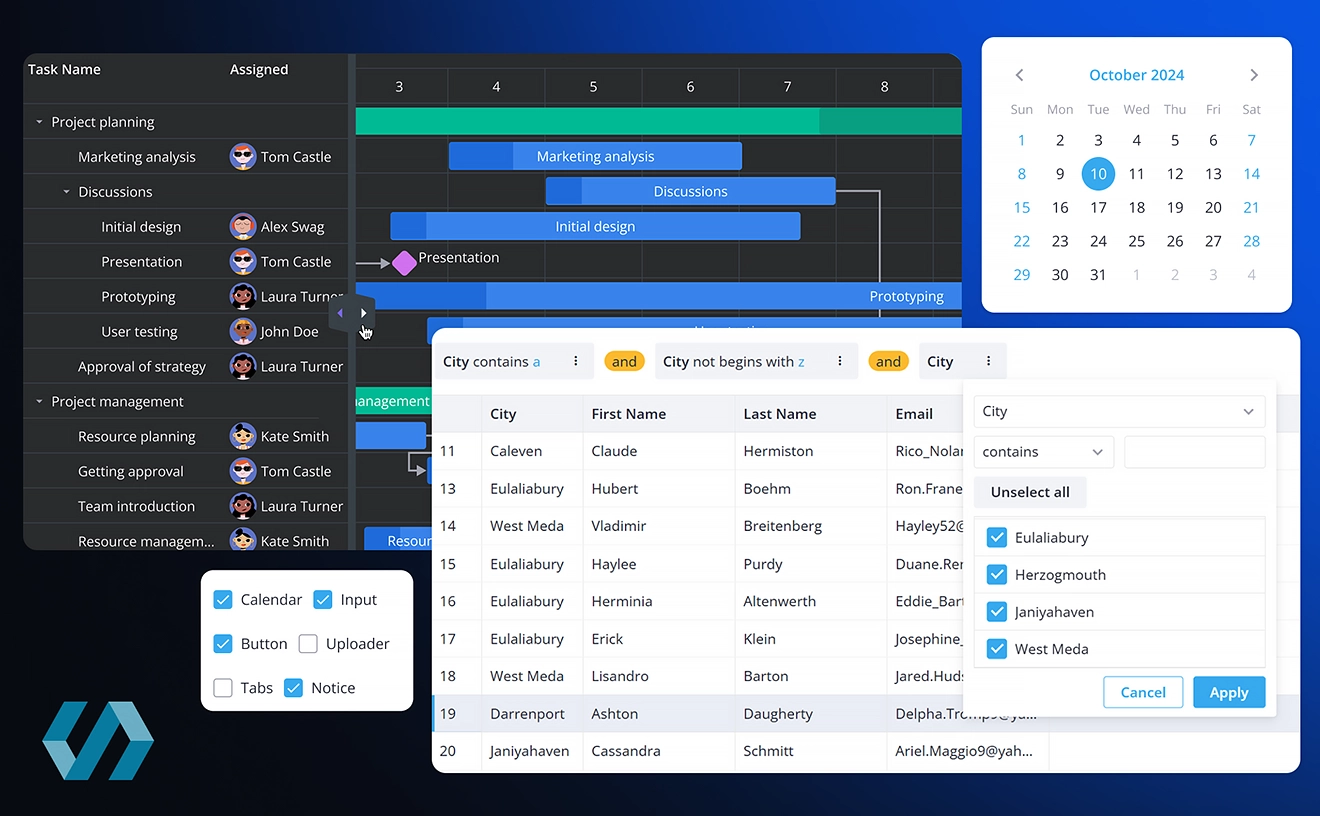
SVAR React includes five advanced, ready-to-use UI components:
- React Gantt: An interactive project timeline featuring drag-and-drop task management, task dependencies, custom time scales, and a configurable grid. The PRO version adds advanced auto-scheduling, resource allocation, and critical-path analysis.
- React Calendar: A fast scheduling widget offering multiple view modes, calendar grouping, and built-in event editing forms;
- React Kanban: A flexible task-board component supporting drag-and-drop card movements, layout configuration, filtering, and grouping;
- React DataGrid: A high-capacity tabular component featuring virtual scrolling, in-cell editing, tree-structured data, sorting, filtering, and frozen columns;
- React File Manager: A web-based file explorer equipped with file operations, preview modes, navigation controls, and keyboard shortcuts.
Depending on the component, SVAR React incorporates essential accessibility features out of the box, including full keyboard navigation and screen-reader compatibility. The components also support built-in filtering, sorting, form management, context menus, and action toolbars.
The suite also supplies foundational modules that power the broader SVAR React ecosystem:
- React Core: Foundational UI elements and form controls used across SVAR components.
- React Editor: A data-binding utility for managing structured forms.
- React Filter: A collection of four distinct filtering utilities, ranging from basic text inputs to advanced query builders and AI-powered natural-language search.
These components can work independently or together to assemble booking systems, admin portals, project management suites, or file management systems.
Built Natively for React
SVAR React components were written specifically for React from the start, avoiding the overhead and quirks of wrapping generic JavaScript libraries. This framework-native approach offers several practical advantages:
- Straightforward integration and styling: Developers interact with standard React props, state lifecycle, and CSS without having to learn an external rendering layer;
- Custom cell and item templates: Pass custom React components to render inside table cells, Kanban cards, custom forms, or popups;
- Next.js compatibility: Modules run cleanly within Next.js using standard client-component directives;
- State management integration: Standard patterns make it easy to connect with state containers like Redux, Zustand, MobX, or TanStack Query;
- TypeScript support: Complete types ship out of the box for component APIs, data schemas, and event handlers.
Minimal Boilerplate
In the case of SVAR React, even complex UI elements do not require hundreds of lines of initialization code. Rather than manually wiring DOM handlers, drag listeners, and virtualization logic, a component like Gantt chart can be instantiated directly through React API:
<Gantt tasks={tasks} links={links} />This single line renders a working Gantt chart and passes your task and dependency data to the component. Internal state and rendering logic remain encapsulated, leaving developers focused on data flow and styling adjustments.
Here is a minimal React Gantt setup example:
import { Gantt, Willow } from "@svar-ui/react-gantt";import "@svar-ui/react-gantt/style.css";
const tasks = [  {    id: 1,    text: "Project Planning",    type: "summary",    start: new Date(2024, 0, 1),    end: new Date(2024, 0, 10),    progress: 100,    open: true  },  {    id: 2,    parent: 1,    text: "Requirements Gathering",    start: new Date(2024, 0, 1),    end: new Date(2024, 0, 5),    progress: 100  }  // ... more tasks];
const links = [{ id: 1, source: 2, target: 3, type: "e2s" }];
export default function GanttChart() {  return (    <div style={{ height: "600px", width: "100%" }}>      <Willow>        <Gantt tasks={tasks} links={links} />      </Willow>    </div>  );}
In this setup, data objects pass through standard props, while the <Willow> wrapper applies SVAR’s baseline theme and styling context.
Performance for Large Datasets and Complex Workflows
Rendering thousands of DOM nodes simultaneously degrades browser responsiveness. SVAR React components employ virtualization, lazy loading, and granular state updates to maintain fluid interactions as data volumes grow.
Key performance mechanisms include:
- Virtualization (DataGrid, Gantt, Kanban): Only DOM elements inside the current viewport are rendered. For a deeper look, see our article on building a data grid for React, Vue, and Svelte;
- Dynamic loading (Gantt, Calendar PRO, Kanban PRO): Data fetches on demand as users scroll or switch date ranges;
- Optimized rendering architecture: DOM updates are optimized to avoid unnecessary full-tree re-renders;
- Reactive store updates: Internal state changes trigger targeted re-renders only for modified UI nodes.
Examples where these techniques apply:
- Gantt with 10,000 tasks →
- DataGrid with virtual scrolling →
- Calendar with dynamic loading →
- Kanban with dynamic loading →
Backend Flexibility
Being a pure React solution, SVAR React UI components operate independently of specific backends or database management systems. You can connect them to your existing API, authentication flow, and application architecture.
To streamline standard CRUD operations, SVAR includes RestDataProvider. This utility captures user actions within the component and dispatches the corresponding REST HTTP requests using its send() method:
import { RestDataProvider } from "@svar-ui/gantt-data-provider";
const server = new RestDataProvider("/api");
// inside init:ganttApi.setNext(server);
For more information, check our integration tutorials:
- Gantt with Next.js (setup, backend, TanStack Query)
- Calendar with Next.js
- DataGrid with Next.js
A Consistent Component System
When an application requires multiple complex widgets, combining unrelated third-party libraries often leads to styling mismatches, conflicting APIs, and duplicated setup code.
SVAR components share a cohesive architecture and design language:
- Unified visual identity: Shared CSS variables keep visual elements uniform across all components, allowing rapid deployment without constructing a standalone design system;
- Light and dark themes: the same
Willow/WillowDarkwrappers work across packages, while CSS variables let each component inherit your palette. - Shared API patterns: Because every component comes from the same development team, API conventions, event handlers, and documentation structures remain identical across packages;
- Modular extension: Core library, along with specialized components like Editor and Filter, function as standalone tools or as power-ups for main components like Gantt, DataGrid, or Calendar.
Open-Source Core + PRO
The core editions of SVAR React components are published under the open-source MIT license, providing a usable foundation for standard application requirements.
For enterprise applications demanding advanced workflows, PRO editions of Gantt, Calendar, and Kanban offer extended capabilities:
- Advanced Gantt auto-scheduling logic, critical path calculation, resource management, and more;
- Additional view modes, recurring events, and dynamic loading for Calendar;
- Dynamic loading, undo/redo, and export options for Kanban.
Developers can start with open-source packages and transition to PRO versions as project requirements scale. Free evaluation trials are available. Commercial PRO licensing supports ongoing maintenance, documentation updates, and technical support via email. For more information, check our licensing and pricing page.
Choosing a UI component is also choosing the team behind it. SVAR is a commercial project: PRO licenses fund the team that ships planned releases, keeps documentation and samples current, and answers questions in the forum and GitHub Issues.
Easy to Use for Developers and Coding Agents
SVAR provides technical documentation, code samples, and support channels to assist with implementation:
- Step-by-step guides and API references;
- Multiple demos and repositories on GitHub;
- A community forum and GitHub issues where the SVAR technical team always replies, so you’re not left alone.
To assist developers using AI coding assistants, SVAR supplies AI tools that give LLMs precise API knowledge:
- MCP Server: Provides live documentation feeds, API signatures, and code examples to AI agents;
- Agent Skills: Native instruction sets optimized for Cursor, Claude Code, Codex CLI, and Antigravity;
- Context Packs: Bundled API documentation that can be dropped into a prompt or attached as file context in ChatGPT, GitHub Copilot, Cursor, or any tool that reads local files.
Get started
SVAR React components are production-ready, customizable, performance-focused, and backend-agnostic. Developers can start with open-source MIT packages and upgrade to PRO tools as feature requirements grow.
Not sure where to start? Here’s a quick map of which components fit common use cases of React applications:
| Use Case | Recommended SVAR Components |
|---|---|
| Project & Task Management | Gantt, Kanban, Calendar |
| Scheduling & Event Bookings | Calendar |
| Data-Intensive Tables | DataGrid, Filter |
| File System Interfaces | File Manager |
| Forms, Navigation & Core UI | Core, Editor, Filter |
Explore SVAR React & get started: