


Here at SVAR, we make rather complex UI components: data grids, Gantt charts, calendars, and other feature-heavy UI modules. All of them have one thing in common: performance matters, since the components need to stay fast and responsive even with big to huge datasets pushed in.
To make things more interesting, we ship the same UI components for React, Svelte, and Vue, which gives us a first-hand perspective on framework comparison. Most comparisons are written by someone who knows one framework well and skimmed the docs for the other two. We had to make each component high-performance three times. A bit crazy, but insightful 💡
In this article we’ll share how we’ve built the same data grid component for these three frameworks and what we’ve done to make it fast.
Framework-Agnostic Performance Problem
A data grid is a good test case for this kind of comparison. Everyone has built or used one, and it punishes lazy engineering faster than anything else in the UI toolbox. It’s structurally simple, but at the same time it’s data-heavy in a way most components aren’t: 1,000 rows is a normal Tuesday, and 10,000 is not uncommon, so you have to plan for it.
👉 For example, see the demo of how SVAR React DataGrid renders 200k rows and 20k columns. Those are crazy numbers, and the grid handles them smoothly.

Render 10,000 rows directly and every framework dies the same death (modern hardware is quite fast, so maybe it just slows down badly). React, Vue, and Svelte all end up asking the browser to build and lay out hundreds of thousands of DOM nodes, and the browser becomes the bottleneck, so the framework barely matters. That failure marks the top of a cost hierarchy:
- Producing HTML is the slowest thing you do, in every framework.
- JavaScript calculations are cheap, but at component scale they’re no longer free.
- Framework overhead (virtual DOM versus compiled DOM operations) is a rounding error compared to the first two.
Once that ordering sinks in, most of the specific techniques below become obvious.
The Common Architecture of SVAR DataGrid
Below we describe how the data grid is designed to be a framework-native in React, Vue and Svelte.
The engine and the integration layer
That framework-independence is worth designing for. Our grid splits into a framework-agnostic core (data structures, config normalization, layout math, etc) and a thin integration layer per framework.
The core is where the hard work lives. The integration layer translates core state into each framework’s reactive primitives, and that split is the only reason maintaining React, Vue and Svelte versions of the component stays realistic.
You don’t need to ship for three frameworks to benefit from the same idea. Even inside a single React app, keeping heavy logic out of components makes it testable, profilable, and immune to render-cycle accidents.
Virtualization is the baseline
Since rendering everything is off the table, the grid (like most of our components) uses rendering virtualization. It measures its container and renders only the rows and columns that fit in view.
At the same time, it draws a hidden placeholder that makes it look and behave as if the full dataset were rendered. On scroll it asks the data store for the newly visible slice and renders it through ordinary React, Svelte, or Vue components.
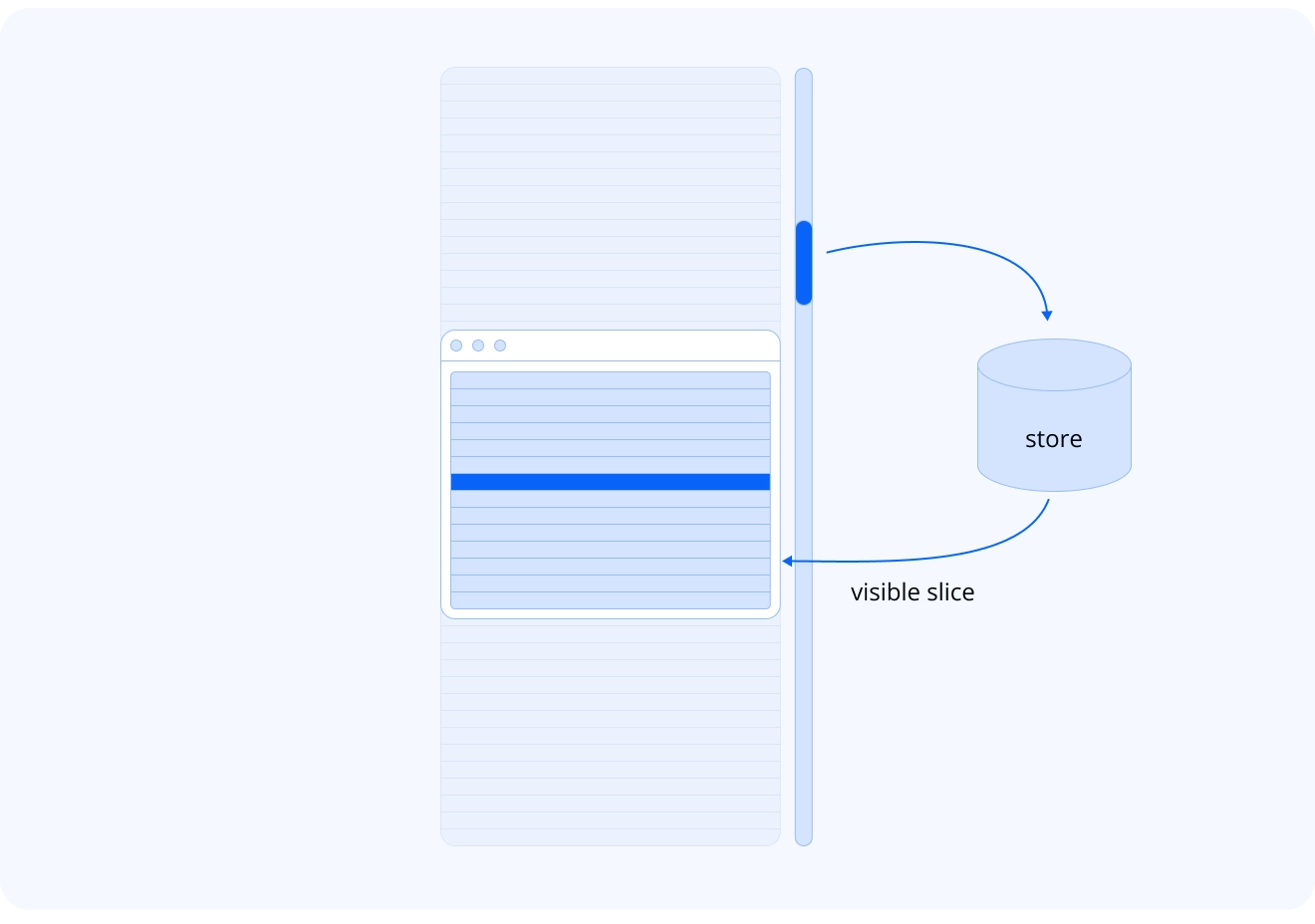
None of the three frameworks gives you anything specific for this task. No primitives, no built-in helpers. Virtualization is plain DOM engineering, and it’s your job. The framework’s job is re-rendering the fifteen rows you decided to show, and that part all three do fine.
Virtualization creates its first problem before any data gets rendered, though. To know which rows are visible you need the container’s size, and to get a size you need to render something. Here we faced chicken and egg problem.
The pattern that works everywhere: render a styled, empty container first, attach a ResizeObserver, and hold off on real data until the first non-zero size arrives. Zero is a legitimate intermediate state, since the CSS that gives the container its height may still be loading.
// React, but the same logic ports to Svelte and Vue as isconst [size, setSize] = useState({ height: 0 });
useEffect(() => {  const element = viewportRef.current;  if (!element) return;
  const observer = new ResizeObserver(    ([entry]) => setSize({ height: entry.contentRect.height })  );  observer.observe(element);
  return () => observer.disconnect();}, []);
if (!size.height) return null;return render();
React has something the others lack here: useLayoutEffect. It runs after the DOM is built but before the browser paints, so you can measure the container, update state, and have the corrected result appear in the very first frame the user sees.
// react onlyconst [size, setSize] = useState({ height: 0 });
useLayoutEffect(() => {  const element = viewportRef.current;  setSize({ height: element.offsetHeight });});
if (!size.height) return null;return render();
People love to mock useLayoutEffect as a footgun, and usually it is one. Virtualized initial measurement is one of the rare cases where it earns its keep.
Now the honest caveat: in practice we fall back to the ResizeObserver path anyway. Layout frequently isn’t ready inside the useLayoutEffect callback, because sizes depend on external stylesheets, fonts, and images that haven’t loaded yet. So you need the observer regardless, and useLayoutEffect becomes a first-frame optimization on top of it rather than a replacement.
Svelte and Vue have no equivalent of useLayoutEffect. Svelte’s $effect.pre fires before the DOM updates, too early to measure. onMount and tick() fire after the DOM exists, but changes made there paint on the next frame, which gains nothing over a bare ResizeObserver.
Vue splits the same way: onBeforeUpdate runs too early, and onUpdated sees the DOM but its changes land in the next rendering frame. A real React advantage, then, though a narrow one. The other frameworks’ designs are defensible, and React grew this hook partly because of how its own render cycle works.
The SSR side note
Virtualization and server-side rendering conflict by definition. The server has no idea which rows will land in the user’s viewport, so it can’t render the right slice. In our experience that costs less than it sounds.
SSR exists mostly for faster first paint, which virtualization already addresses in its own way, and for SEO, which was never going to work with a component that renders 15 of 100,000 rows.
With plain React or Vue you’ll never notice the conflict. With Next.js or Nuxt you will — usually in the form of a cascade of hydration mismatch errors. The solution is refreshingly boring: mark the grid as a client-only component, and the errors disappear. It’s a trade-off we’ve learned to accept and move on from.
Inner logic: memoization and derived state
Before we go further, we need to note:
React’s original performance bet was “HTML rendering is slow, JavaScript is fast, so re-running component code is fine.” And for a simple button it works perfectly.
However, a data grid normalizes data and config, computes layout, and resolves column geometry before it renders anything, and our Gantt component computes even more. At that scale, re-running everything on every render stops being fine.
useMemo and useCallback are the standard React answer, and for complex components they’re your best friends:
// Reactconst normalizedHeaders = useMemo(() => normalize(columns), [columns]);const columnCount = normalizedHeaders.length;Svelte expresses the same idea with $derived:
// Svelteconst normalizedHeaders = $derived(normalize(columns));const columnCount = $derived(normalizedHeaders.length);And Vue with computed:
// Vueconst normalizedHeaders = computed(() => normalize(columns));const columnCount = computed(() => normalizedHeaders.value.length);The reactivity machinery underneath differs wildly. Usage barely does. All three give you the same cheap contract: this value is preserved until its inputs change.
When we ported the grid’s virtualization math (visible row ranges, left/right/center column splits, full scroll height), it moved between useMemo, $derived.by, and computed as a near line-for-line translation. Syntax shifts between $x, x.value, and plain values, while the logic ports verbatim. If you know one framework, you already understand the other two here.
One real divergence hides inside that sameness. React makes you write the dependency arrays by hand. Our renderRows memo lists eight dependencies, and missing one means a stale grid that’s miserable to debug. Svelte and Vue track dependencies automatically.
What the defaults of React, Vue and Svelte do to you
Speaking about the default nature of the frameworks, there’s a structural difference in when component code runs, and it shapes everything. Svelte and Vue execute a component’s setup code once. React re-runs the whole function body on every render.
In Svelte or Vue, “create the data store” is a plain statement. In React the same intent costs a spread of idioms: useMemo(() => new DataStore(...), []) for the store, a useRef with a null check for the event bus wiring, and a synchronous first-render init call kept outside useEffect, because effects fire after paint, too late for the first frame. One concept, four idioms.
But that model has a flip side. Since Svelte and Vue run a component’s setup code only once, reactivity is something you opt into explicitly — which means accidental recalculations are rare almost by design. The risk simply moves elsewhere: you can forget to make a value reactive in the first place, and end up shipping something that quietly never updates. In practice, automatic dependency tracking and lint tooling catch most of those cases.
So it’s a trade-off, not a verdict. React’s model is riskier by default, but it’s fully explicit — you can always see what’s happening. Svelte’s and Vue’s are safer by default, but every now and then they’ll surprise you.
None of that means wrapping everything in useMemo. Most calculations are too cheap to bother with. Find the heavy chunks, by reading the code or better by profiling, and preserve those between renders. That’s the whole discipline.
Side note: one store, three adapters
For the SVAR components, memoization alone wasn’t enough, so we run a single framework-agnostic reactive store and adapt it to each framework’s primitives.
Svelte consumes it through real svelte/store writables with $store auto-subscription. Vue gets refs through a small subscribe() helper.
React gets hooks, useStore(api, 'name'), built on useState plus a subscription in useEffect. React also needed one extra device: a useStoreWithCounter hook that returns a change counter to use as a dependency, because when an array is mutated in place, reference equality can’t see the change.
If you target a single framework, you don’t need any of this. React and Vue both have mature external-store ecosystems, and Svelte 5’s .svelte.js state modules are a genuinely nice native option. They just weren’t ours to use, since one store had to serve three hosts.
Data updates: where the component tree fights you
Data updates are where a developer’s intuition fails hardest. You’d expect this to be the place where each framework’s native data flow shines, however practice shows less difference than you’d expect, with one small caveat.
Plain React is built on the idea that prop changes bubble up: a cell edit bubbles to the table level, state updates there, and changes propagate back down. For a small form, it works just fine, but for a data grid with lots of cells, faintly ridiculous.
Editing one cell recalculates the whole table, recreating element objects for hundreds of cell components (tens of thousands without virtualization) just so one cell can repaint. Each object is cheap, but the sum isn’t. At this scale, a store that components subscribe to directly — skipping the tree entirely — stops being a luxury in React. It’s mandatory.
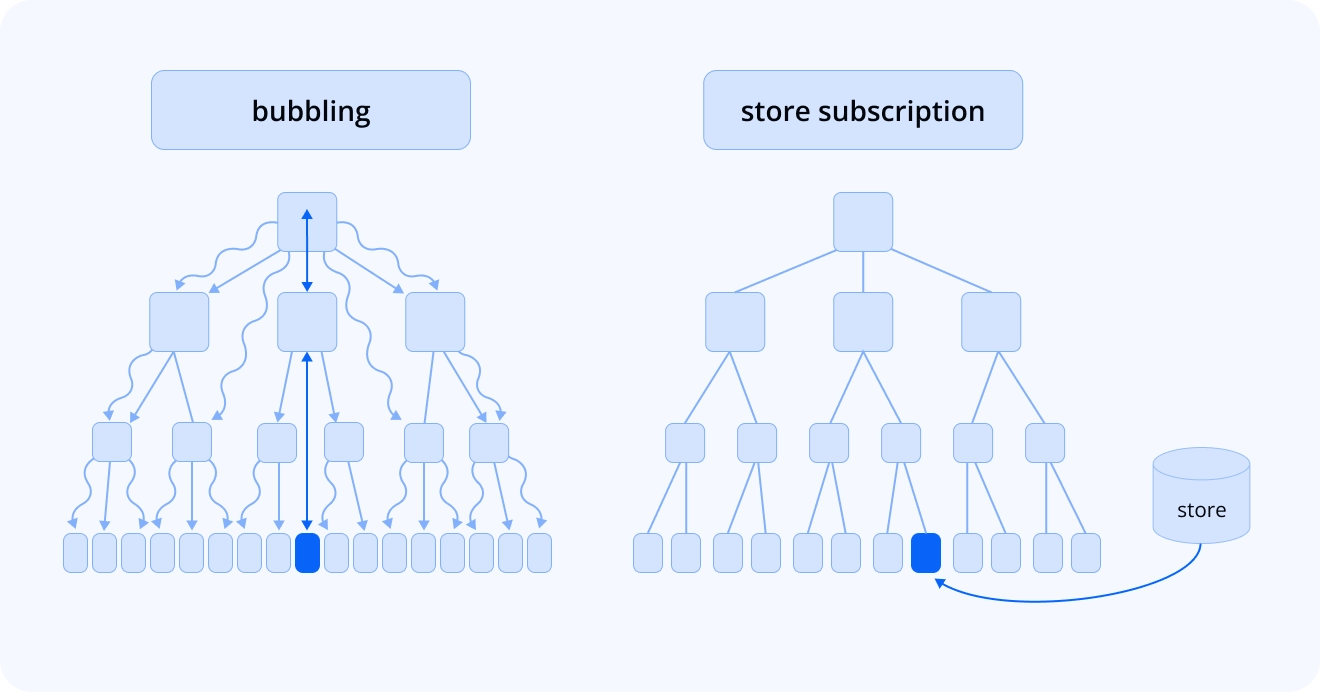
Svelte and Vue (and the React Compiler, which we unfortunately can’t use) have their own ways to limit recalculation to the affected subtree only, so both can operate at grid scale without an external store. We use the store-subscription architecture in all three anyway, but for maintenance rather than speed: one data flow to reason about instead of three.
Not every change moves comfortably into a store, so some updates still travel through the tree. For those, useMemo can cache JSX elements, not only values. Compare two code samples below:
// one change recalculates everythingreturn ( <div> <Header columns={columns} /> <Body data={data} /> </div>);// only the changed part recalculatesconst header = useMemo( () => <Header columns={columns} />, [columns]);const body = useMemo( () => <Body data={data} />, [data]);
return ( <div> {header} {body} </div>);Now a data update leaves the header untouched, and a column change leaves the body alone. Svelte and Vue do this automatically. Or at least they’re supposed to, since you can’t control it directly either way.
What the Numbers Say
The measurements below come from equivalent implementations of the same grid, same scenarios, same machine. I’m sharing them for the curious, and I’d ask you to resist reading them as a benchmark verdict.
| Framework | 1,000 rows (15 visible) | 100,000 rows (15 visible) | 1,000 rows (all visible) |
|---|---|---|---|
| React | 13 ms | 44 ms | 442 ms |
| Svelte | 9 ms | 39 ms | 412 ms |
| Vue | 12 ms | 42 ms | 469 ms |
Two things stand out. With virtualization, render time barely reacts to the total dataset: going from 1,000 to 100,000 rows adds roughly 30 ms in every framework, and that overhead comes from handling bigger data structures, since none of the extra rows reach the DOM. Svelte runs a touch lighter throughout, within what I’d call the error margin.
The all-visible column is the interesting one. Rendering every row is rare in production, though some use cases want it. Times grow by more than an order of magnitude, roughly in proportion to the amount of rendered HTML, and the three frameworks still finish within about 15% of each other. Which is the cost hierarchy from the beginning, now with receipts: DOM size dominates, recalculation comes second, and the framework’s own weight trails far behind.
Practical Conclusions
Here’s what we’d tell a developer building a heavy component in any of the three frameworks.
Limit the active DOM first: Virtualize anything that scrolls over real data. Prefer simpler markup: the fewer nodes your hot path generates, the faster it will be. Every measurement we have says this dwarfs everything else.
Preserve heavy calculations, strategically: Wrap the expensive parts in useMemo (or bite the bullet and enable the React Compiler, which will do it for you) when profiling points at them, and skip the reflexive wrapping of everything else. In Svelte and Vue this behavior is close to the default mode, so there’s usually nothing extra to do.
Take data flow seriously: Bubbling changes through the tree causes subtree recalculations that virtualization and memoization only partly absorb. Stores with direct subscriptions fix it. In React that means an external store. In Svelte 5, look at .svelte.js/.svelte.ts state files before reaching for a library.
And when something is slow, keep two categories separate:
Framework limitations are real but rare: the initial-measure timing gap outside React, React’s element-recreation cost model, hand-written dependency arrays.
Implementation mistakes are common: missing virtualization, unmemoized heavy work, table markup, state lifted higher than it needs to be.
If your app is slow, the framework is the last suspect I’d interrogate, because the expensive parts aren’t tied to any framework. They’re tied to your architecture. And that’s the good news: the skill transfers between platforms, the patterns travel with it, and that’s the whole point.