

Earlier we published two guides on how to use SVAR React Gantt with Next.js, covering how to build the chart itself and how to connect it to a backend:
- Part one: Building a Gantt Chart in Next.js
- Part two: Building a Gantt Chart in Next.js: Backend
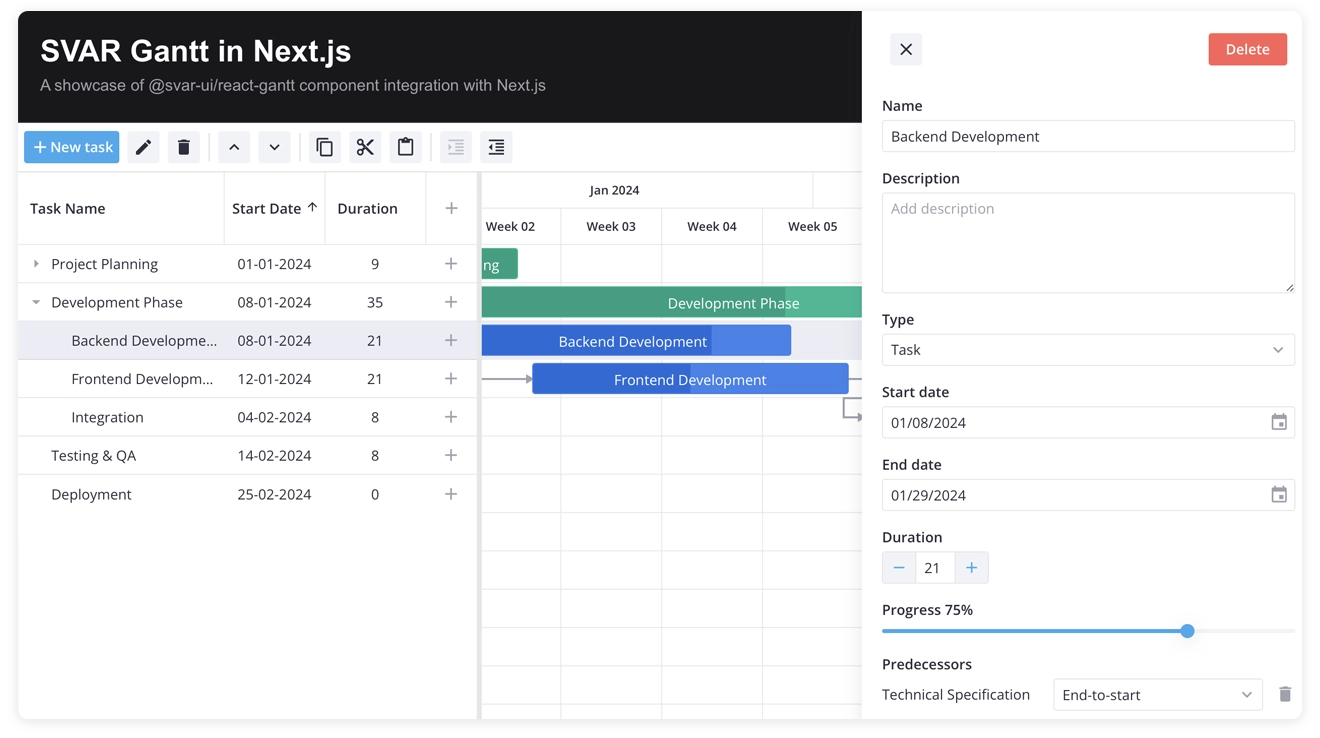
This guide continues the series and shows how to use the Gantt chart with TanStack Query, a popular data-fetching library that web applications use to fetch, cache, and synchronize server state.
With 50k+ stars on GitHub, TanStack Query is one of the most widely used tools for managing server state in React applications. The State of React 2025 survey reports that 68% of respondents have used TanStack Query in their work.
Since Gantt charts are usually used in project management applications, teams need reliable handling of asynchronous updates to keep schedules, task progress, and dependencies in sync. That is why we created this tutorial.
Prerequisites: Basic Next.js, React, and TanStack Query knowledge
Demo code: View on GitHub (the
tanstack-query branch)Tested with: Next.js 16, React 19, TanStack Query 5.x, @svar-ui/react-gantt 2.7
In the previous posts, we explained how to build a React Gantt chart that loads data from SQLite and saves each change through the RestDataProvider helper. Now we will describe how to send that traffic through TanStack Query, which will bring the Gantt into the same data layer as the rest of the application.
What TanStack Query Adds to SVAR React Gantt
If your project already uses TanStack Query, it makes sense to use it for the Gantt chart as well. This approach gives us:
- Retries with backoff when a write fails
- Ordered requests, so the server receives changes in the same order the user made them
- Offline handling, which pauses writes when the connection drops and resumes them when it returns
- Central error handling, including proper HTTP status code checks
- Observable state through
useIsMutating,useMutationState, and the Query Devtools - Loading state for the first fetch through
isPending,error, andrefetch
We can add all of this with one small subclass of RestDataProvider. The key is to connect TanStack Query at the right point in the Gantt chart integration with Next.js.
Why Keep RestDataProvider Instead of useMutation?
You could replace the RestDataProvider helper with separate useMutation calls for the Gantt actions, such as creating, updating, or deleting tasks and links. That would work, but you would need to rebuild several things that the data provider already handles:
Temporary IDs
When a user adds a task to a Gantt chart, the store creates it right away with an ID such as temp://1787569967079. The server later assigns the real ID. RestDataProvider maps the temporary ID to the server ID for every request that follows.
Dependent requests
A user may rename a task one second after creating it. That update needs the real server ID, which may still be on its way. The data provider waits for the add-task response before it sends update-task for the same item.
Debouncing
Editing task text produces a stream of update-task actions. The data provider service combines updates for each task and sends one write to the server.
Payload details
RestDataProvider removes technical fields, formats dates, and prepares other request data.
With the data provider, optimistic updates are already covered too. The Gantt store applies every change as soon as the user makes it and remains the source of truth. The server request confirms the change. The row is already visible, which removes the need for onMutate, setQueryData, and rollback.
This gives each part a clear responsibility:
| Concern | Owner |
|---|---|
| Optimistic UI, undo, tree state | Gantt store |
| Temporary IDs, request ordering, debouncing, payload shape | RestDataProvider |
| Transport: retries, status codes, offline behavior, observability | TanStack Query |
The provider is responsible for the Gantt-specific synchronization work, including debouncing server requests and handling data operations triggered by Gantt actions. The integration below keeps the RestDataProvider and gives it a TanStack Query transport.
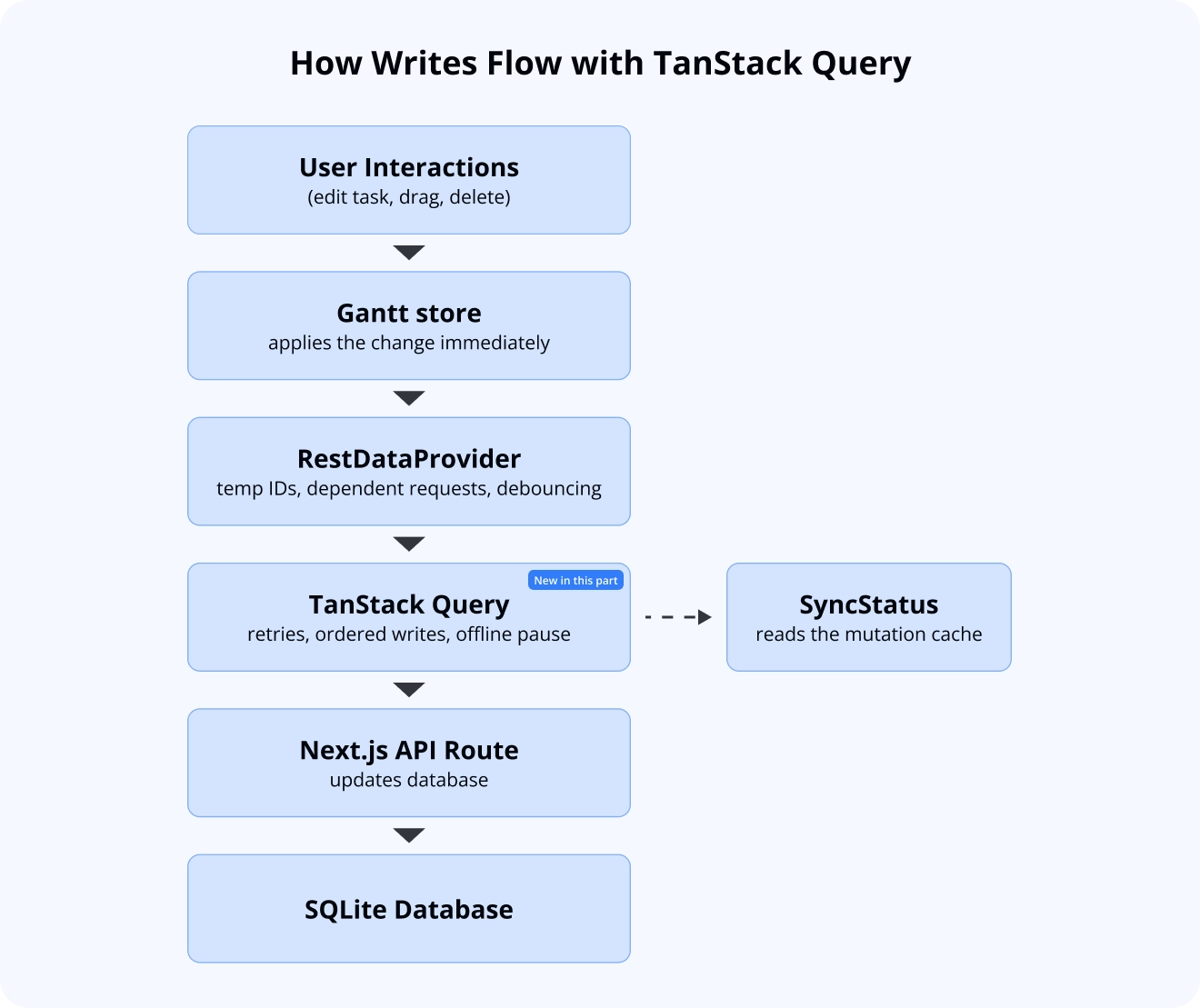
A change flows from the Gantt store through RestDataProvider and TanStack Query to the Next.js API route and SQLite, while SyncStatus reads the mutation cache.
Connecting TanStack Query with RestDataProvider
The data provider service sends every request through a single method: send(). All action handlers use this method, and getData() calls it directly as well. That makes send() the ideal place to change how data is transferred without affecting the rest of the provider’s behavior.
By overriding this method, we can swap out the transport layer for both reads and writes while keeping everything else in RestDataProvider unchanged. The backend guide used the same method for error notifications. In this guide, we’ll use it to take the integration one step further and connect the provider to TanStack Query.
Installing TanStack Query
Install TanStack Query via NPM:
npm install @tanstack/react-queryNext, add a provider at the application root. This provider creates a shared Query Client for the app and gives components access to TanStack Query’s cache, loading state, and mutation handling. With the App Router, it must be a client component:
"use client";
import { useState } from "react";import { QueryClient, QueryClientProvider } from "@tanstack/react-query";
export default function Providers({ children }) {  const [queryClient] = useState(    () =>      new QueryClient({        defaultOptions: {          queries: {            staleTime: Infinity,            refetchOnWindowFocus: false,            refetchOnReconnect: false,          },        },      })  );
  return (    <QueryClientProvider client={queryClient}>{children}</QueryClientProvider>  );}
TanStack Query usually refreshes data in the background when the window gains focus, the connection returns, or cached data becomes stale. That works well for ordinary lists with raw data, but the Gantt needs a different setup.
After the first load, the Gantt store owns the data. Loading the data again rebuilds its internal structure. It can also reset related state such as undo history, filters, and sorting because those features belong to the task set being replaced.
For this reason, the query loads once. Refreshing becomes a deliberate user action. staleTime: Infinity makes that choice explicit.
Mutations also leave the query unchanged. Each update is already visible in the Gantt store, so there is no stale query data to refresh after a write.
Creating a RestDataProvider Subclass
Here is the integration code of the data provider:
import { RestDataProvider } from "@svar-ui/gantt-data-provider";import type { QueryClient } from "@tanstack/react-query";
export const GANTT_MUTATION_KEY = "gantt";
// all writes share one scope, so TanStack runs them strictly in orderconst GANTT_SCOPE = { id: "gantt-sync" };
const pad = (n: number) => String(n).padStart(2, "0");
// the backend keeps dates as "YYYY-MM-DD HH:mm:ss" text and reads them back as// local time, so toISOString() would shift every task by the UTC offsetfunction formatDate(date: Date): string {  return (    `${date.getFullYear()}-${pad(date.getMonth() + 1)}-${pad(date.getDate())} ` +    `${pad(date.getHours())}:${pad(date.getMinutes())}:${pad(date.getSeconds())}`  );}
function serializeDates(value: unknown): unknown {  if (value instanceof Date) return formatDate(value);  if (Array.isArray(value)) return value.map(serializeDates);  if (value && typeof value === "object") {    return Object.fromEntries(      Object.entries(value as Record<string, unknown>).map(([key, item]) => [        key,        serializeDates(item),      ])    );  }  return value;}
export class QueryRestProvider extends RestDataProvider {  constructor(url: string, private queryClient: QueryClient) {    super(url);  }
  async send<T>(    url: string,    method: string,    data?: any,    customHeaders: any = {}  ): Promise<T> {    // reads belong to useQuery, only writes become mutations    if (method === "GET") {      return this.request<T>(url, method, data, customHeaders);    }
    return this.queryClient      .getMutationCache()      .build<T, Error, void, unknown>(this.queryClient, {        mutationKey: [GANTT_MUTATION_KEY, method, url],        mutationFn: () => this.request<T>(url, method, data, customHeaders),        scope: GANTT_SCOPE,        // a POST that timed out may already have inserted the row        retry: method === "POST" ? 0 : 2,        retryDelay: (attempt) => Math.min(1000 * 2 ** attempt, 8000),      })      .execute(undefined);  }
  private async request<T>(    url: string,    method: string,    data?: any,    customHeaders: any = {}  ): Promise<T> {    const response = await fetch(`${this._url}/${url}`, {      method,      headers: { "Content-Type": "application/json", ...customHeaders },      body: data ? JSON.stringify(serializeDates(data)) : undefined,    });
    if (!response.ok) {      throw new Error(`${method} /${url} failed with ${response.status}`);    }
    return response.json() as Promise<T>;  }}
There are three important choices in this code we would like to mention:
Creating mutations outside a component
useMutation is a React hook, so it belongs in a component. These requests start in the SVAR React Gantt action pipeline, and they can happen outside a component render.
queryClient.getMutationCache().build(...).execute(...) gives us the same mutation system without a hook. Retries, scopes, network mode, cache notifications, and Query Devtools support all work in the usual way.
We can use useIsMutating for the shared status line. This fits the Gantt chart component well because the relevant actions all contribute to one sync status. Each request receives a mutation key in the form ['gantt', method, url]. The key makes individual requests easy to find in Query Devtools. It also lets us filter all Gantt mutations with the "gantt" prefix.
Skipping retries for creates
The code uses retry: 2 for PUT and DELETE, because those requests are safe to repeat. POST is different: if a create request times out, the server may have already created the row. Retrying it could create a duplicate, so create requests do not get retries.
Checking status codes
fetch resolves normally for HTTP errors such as 404 and 500. In those cases, response.ok is false. The custom request() method checks that value and throws an error when the response fails, so TanStack Query can treat the write as an error.
Handling Failed Writes in SVAR React Gantt
Writes can now fail, so we need to handle one more detail. Gantt actions are fire-and-forget, which means the Gantt starts the action pipeline without waiting for the result. If a write fails and the error continues through the chain, it turns into an unhandled promise rejection.
You can catch the error at the provider entry point:
// add this method to QueryRestProvider; add the import to the top of the fileimport type { TMethodsConfig } from "@svar-ui/react-gantt";
async exec(  name: keyof TMethodsConfig,  ev: TMethodsConfig[keyof TMethodsConfig]): Promise<TMethodsConfig[keyof TMethodsConfig]> {  try {    return await super.exec(name, ev);  } catch (error) {    console.error(`[gantt] "${String(name)}" was not saved`, error);    return ev;  }}
The mutation cache still records the error with status: "error", and the status indicator in the next section reads that state. This catch simply keeps the rejected promise inside the provider flow.
Loading Gantt Data with useQuery
getData() from RestDataProvider remains the best way to load the Gantt chart data. It fetches tasks and links in parallel and converts date strings into Date objects. We only need to use it as the queryFn:
const queryClient = useQueryClient();
const server = useMemo(  () => new QueryRestProvider("/api", queryClient),  [queryClient]);
const { data, isPending, error, refetch } = useQuery({  queryKey: ["gantt"],  queryFn: () => server.getData(),});
The query gives us loading and error states directly. We no longer need a useEffect or custom loading state:
if (isPending) return <div>Loading tasks…</div>;
if (error) {  return (    <div>      <p>Could not load the project: {error.message}</p>      <button onClick={() => refetch()}>Retry</button>    </div>  );}
This also helps with Next.js hydration. In the backend guide, the component used a mounted flag so the server and client produced the same first render. isPending now provides that shared first state. The query starts on the client, so both sides first render the loading placeholder and hydration matches.
Connecting the provider to the Gantt still uses setNext:
const init = useCallback( (ganttApi) => { setApi(ganttApi); ganttApi.setNext(server); }, [server]);Showing Gantt Sync State
Now every write appears in the mutation cache. A small component can turn that data into a status indicator:
"use client";
import { useIsMutating, useMutationState } from "@tanstack/react-query";import { GANTT_MUTATION_KEY } from "@/lib/gantt/QueryRestProvider";
const filters = { mutationKey: [GANTT_MUTATION_KEY] };
export default function SyncStatus() {  const pending = useIsMutating(filters);  const failed = useMutationState({    filters: { ...filters, status: "error" },    select: (mutation) => mutation.state.error?.message,  });
  if (failed.length) return <span>{failed.length} change{failed.length > 1 ? "s" : ""} not saved - reload to resync</span>;  if (pending) return <span>Saving {pending} change{pending > 1 ? "s" : ""}…</span>;  return <span>All changes saved</span>;}
This gives us the same overall result as the onProgress callback from the Progress and Sync State section of the backend guide. It also shows whether operations are pending or have failed, with no extra state wiring.
Features That Keep Working
Since we changed only the transport layer, everything built on top of RestDataProvider continues to work as before. The provider still handles the Gantt-specific behavior, and TanStack Query only takes over the request layer.
- Row reordering still sends
{ "operation": "move", "mode": "after", "target": 4 }through the samePUTendpoint - Batch mode still works when your server exposes a batch endpoint. The provider passes the
batchURLoption to the base class (see the example below), and the combined request goes throughsend()as one mutation - Authentication headers can go in
request(), where they apply to both reads and writes - Existing REST endpoints stay the same, so the server needs no changes for the setup in this guide
To enable batch mode, let the constructor accept the provider’s config argument and pass it to the base class:
constructor( url: string, private queryClient: QueryClient, config?: { batchURL: string }) { super(url, config);}Then create the provider with new QueryRestProvider("/api", queryClient, { batchURL: "batch" }) — the value is appended to the provider’s base URL, so it takes no leading slash. The demo project does not use batch mode. Batched requests are sent as POST, so TanStack Query does not retry them.
Here is a quick way to test the setup: add a task, rename it right away, and link it to another task. The follow-up requests should use the real server ID in place of the temporary ID:
POST /tasks {"task":{"id":"temp://1787569967079","text":"From TanStack", ...},"mode":"child","target":0}POST /links {"id":"temp://1787569967087","source":11,"target":1,"type":"e2s"}PUT /tasks/11 {"operation":"move","target":1,"mode":"after"}PUT /tasks/11 {"id":11,"text":"Renamed","progress":42}Limitations of the TanStack Query Integration
The integration works well with a few limits worth keeping in mind:
The Devtools focus on writes
After the first load, task data lives in the Gantt store. The query cache contains one query and a stream of mutations, and in this setup the mutations carry the most useful sync information.
Recovery requires a reload
If a write fails after all retries, the change remains on screen while the database keeps its previous value. The Gantt does not support per-action rollback, so the user should be informed that saving failed and asked to reload fresh data to recover. This is the same approach described in the backend guide. TanStack Query makes the error visible, and client-side validation helps keep these failures rare.
Server-side prefetch needs extra date handling
You can use HydrationBoundary with the App Router, but getData() returns Date objects, and dehydration serializes data as JSON. The client would need to convert those values back into dates. Since the initial load is usually fast, the loading placeholder keeps this example simpler.
Failed writes are forgotten after five minutes
Failed mutations stay in the mutation cache only for TanStack Query’s default gcTime of five minutes. After that the cache no longer holds the failure, and the indicator goes back to “All changes saved”, even though the change was never saved.
Complete Component Code
Here is the full component with the query setup, the Gantt provider, and the sync status indicator wired together:
"use client";
import { useState, useCallback, useMemo } from "react";import { useQuery, useQueryClient } from "@tanstack/react-query";import { Gantt, Toolbar, Willow, Editor } from "@svar-ui/react-gantt";import { QueryRestProvider } from "@/lib/gantt/QueryRestProvider";import SyncStatus from "./SyncStatus";import "@svar-ui/react-gantt/all.css";
const scales = [  { unit: "month", step: 1, format: "%M %Y" },  { unit: "week", step: 1, format: "Week %w" },];
const NO_SELECTION = [];const NO_MARKERS = [];const SCHEDULE = { type: "forward" };
export default function GanttChart() {  const queryClient = useQueryClient();  const [api, setApi] = useState(null);
  const server = useMemo(    () => new QueryRestProvider("/api", queryClient),    [queryClient]  );
  const { data, isPending, error, refetch } = useQuery({    queryKey: ["gantt"],    queryFn: () => server.getData(),  });
  const init = useCallback(    (ganttApi) => {      setApi(ganttApi);      ganttApi.setNext(server);    },    [server]  );
  if (isPending) return <div>Loading tasks…</div>;
  if (error) {    return (      <div>        <p>Could not load the project: {error.message}</p>        <button onClick={() => refetch()}>Retry</button>      </div>    );  }
  return (    <Willow>      <div style={{ display: "flex", alignItems: "center" }}>        <Toolbar api={api} />        <SyncStatus />      </div>      <Gantt        tasks={data.tasks}        links={data.links}        scales={scales}        selected={NO_SELECTION}        markers={NO_MARKERS}        schedule={SCHEDULE}        init={init}      />      <Editor api={api} />    </Willow>  );}
Summary
SVAR React Gantt works with TanStack Query by changing only its transport layer. RestDataProvider keeps the Gantt-specific logic, and TanStack Query handles the requests:
send()is the single connection point for reads and writes.RestDataProviderstill handles temporary IDs, dependent requests, debouncing, and payload formatting.- The Gantt store still applies changes immediately, so the UI stays optimistic without
onMutate,setQueryData, or rollback code. - TanStack Query handles retries, ordered writes through
scope, offline behavior, status code checks, and observable mutation state. useQueryhandles the initial load, andisPendinggives a safe first state for Next.js hydration.
Why use SVAR React Gantt with TanStack Query
With TanStack Query, SVAR React Gantt uses the same server-state tool as the rest of your React app, so there is no separate data flow to maintain. Pending, retried, and failed writes appear in the same mutation cache and Query Devtools as your other requests.
One RestDataProvider subclass replaces separate useMutation calls for creating, updating, and deleting tasks and links, and writes are sent in order, retried with backoff, and paused while the connection is down. The REST endpoints stay the same as in the backend guide, so the server needs no changes.
👉 Find the full demo on GitHub and try it yourself.