

Introduction
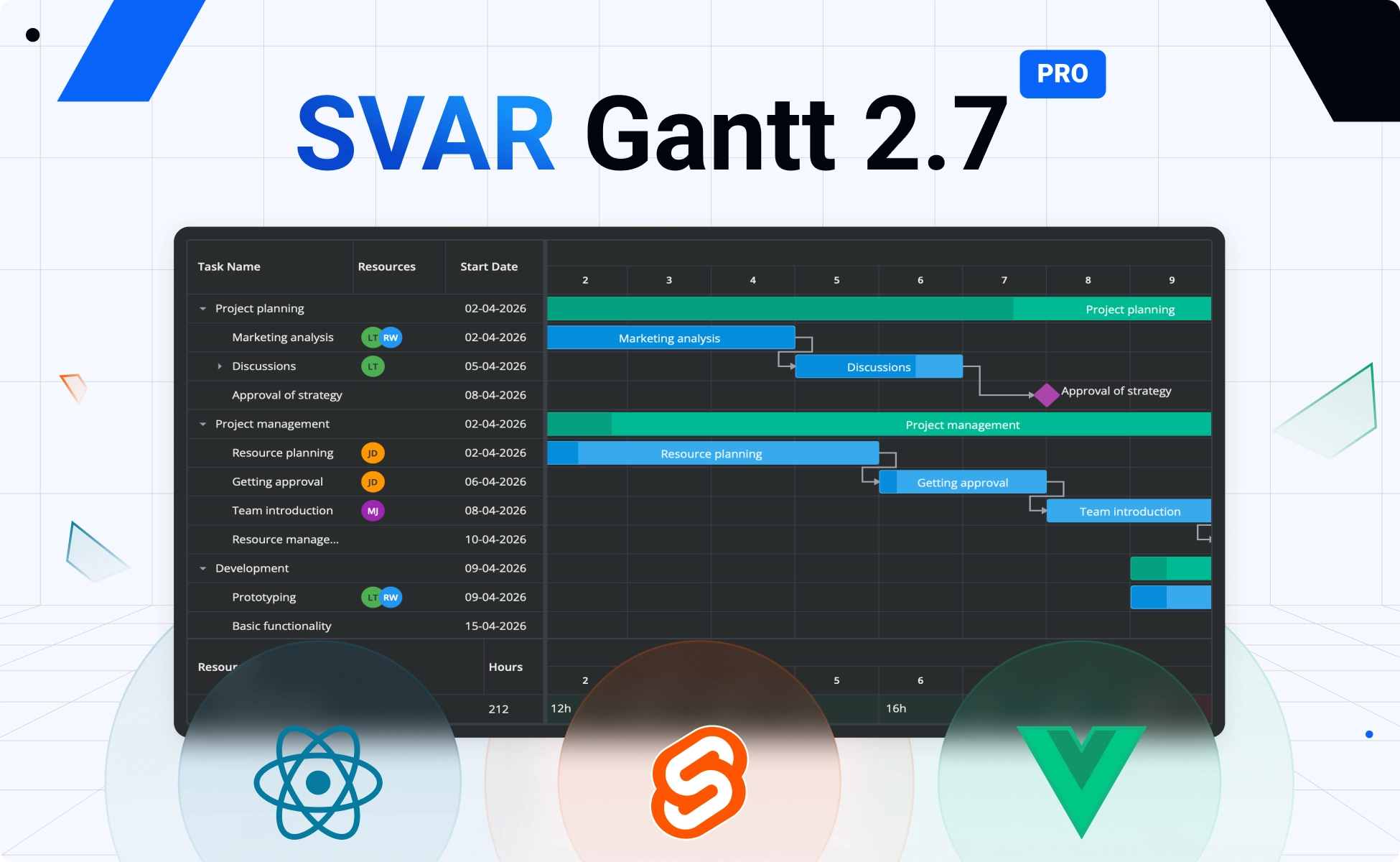
We’re excited to introduce version 2.7 of SVAR Gantt for Svelte, React, and Vue. This release brings powerful resource planning capabilities to the forefront, making it easier to assign work, balance workloads, and manage project capacity directly in the Gantt chart.
Along with virtualized Gantt scales, a smarter editor for tasks and split tasks, and improved tooltips, SVAR Gantt 2.7 gives teams the tools they need to build modern project scheduling interfaces with better performance and more control.
UX Improvements for Open-Source Edition
You can install the latest free versions of SVAR Gantt component from npm:
npm install @svar-ui/svelte-ganttnpm install @svar-ui/react-ganttnpm install @svar-ui/vue-ganttAll three framework editions – Svelte, React, and Vue – are also available on GitHub. If SVAR Gantt becomes part of your workflow, starring the repository is a simple way to support the project and influence what we build next 🌟
🔹 Virtual Scale Rendering
In this release we’ve added virtualization for Gantt scales – now only visible time-unit cells are rendered on the scale. This means that users can create long and detailed timelines without running into performance issues. For example, you can build a multi-year chart with “hour” as the lowest unit and scroll or zoom it smoothly with no lag.
🔹 Updated Tooltips
SVAR Gantt now uses enhanced tooltips with support for delay, position, arrow, touch behavior, and custom content. Tooltips are now available not only for task bars and rollups but also for links and resource-load cells, making it easier to show detailed, context-specific information directly on the chart.
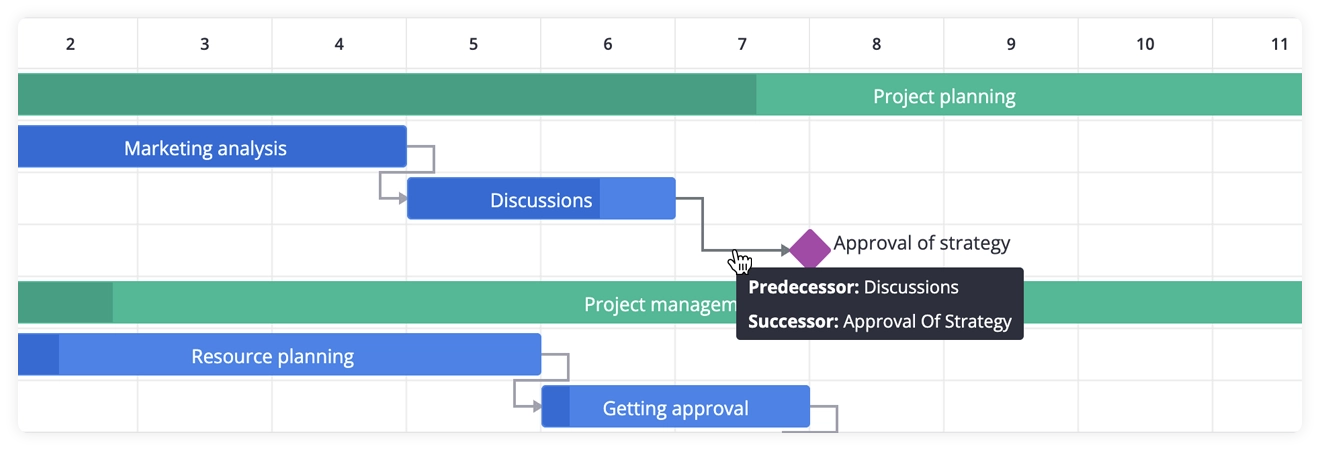
Demo with tooltips: React • Svelte • Vue
🔹 Import from Excel / CSV
SVAR Gantt now includes an ExcelImport widget for Excel / CSV import that converts spreadsheet data into Gantt-ready JSON.
The widget opens a wizard where users upload a file and map its columns to task or link fields. When the mapping is confirmed, the wizard returns a validated array of objects ready to load into the chart. It supports auto-detection, data validation, optional ID generation, and localization, making it easy to bring existing project data into Gantt.
ExcelImport is provided as a free, standalone add-on. Install the package next to Gantt to enable the import wizard:
npm install @svar-ui/svelte-excel-importOnce installed, wire the widget into your Gantt component like this:
<Gantt />
{#if showImport}  <ExcelImport    fields={taskFields}    onimport={handleTasksImport}  />{/if}
Import from Excel/CSV demo: React • Svelte • Vue
Resource Planning and Individual Calendars in PRO Edition
This release brings full resource-management capabilities to the PRO Edition of SVAR Gantt. It introduces a set of major enhancements that let teams assign tasks and balance workloads directly inside the component. Let’s walk through the new features in detail.
🔹 Ability to assign resources to tasks
The PRO Edition introduces a comprehensive resource-assignment model. You can load resources and assignments collections to show who is responsible for each task as soon as the Gantt renders. Just pass your predefined arrays into the component. Resources may be flat or hierarchical, and assignments link each resource to a task with optional allocation units.
<Gantt tasks={...} {resources} {assignments} />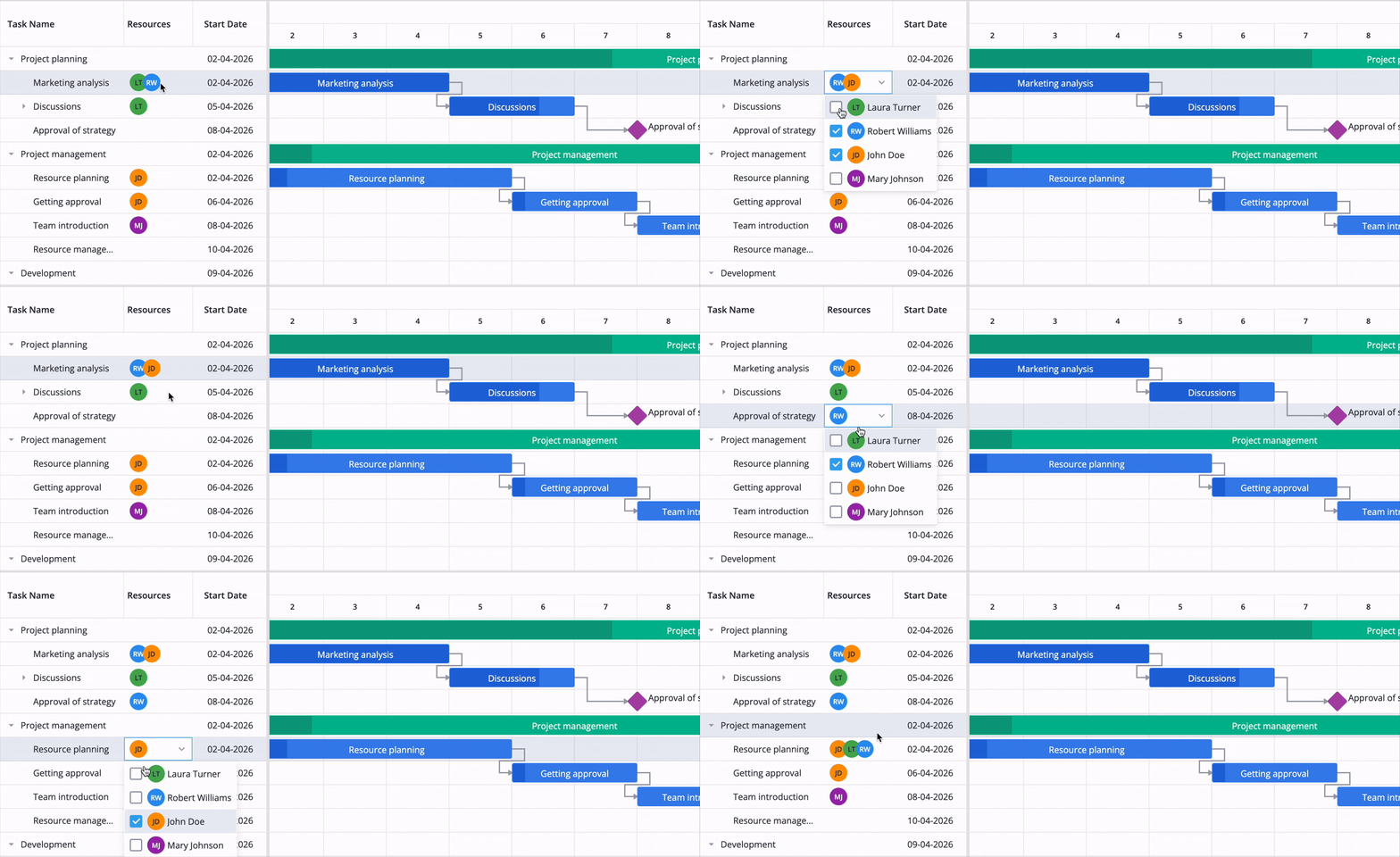
You can view team members linked to tasks in the dedicated resources column that is automatically added when you provide an array of resources. Optionally, you can make the column editable by assigning the multiselect editor to it via getDefaultColumns:
<script>  const columns = getDefaultColumns({ resources: true });  columns.find(c => c.id === "resources").editor = "multiselect";</script>
<Gantt {tasks} {resources} {assignments} {columns} />
Resources demo: React • Svelte • Vue
🔹 Resources tab in the Editor
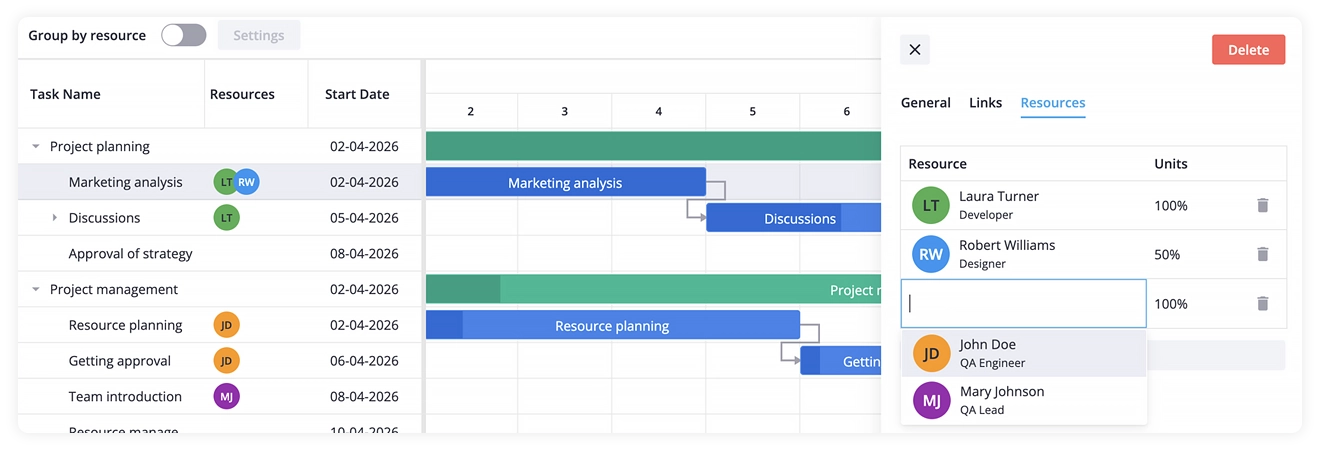
The Editor now includes a dedicated Resources tab whenever resource data is present. It allows users to assign or unassign resources, adjust allocation units, and review all task-level assignments in one place.
🔹 Backend integration for resources
For backend-driven applications, SVAR Gantt can load and save resource data through the RestDataProvider. Resources and assignments can be fetched from the server, edited by the user, and serialized back. We also provide a sample Go backend that supports resources – you can use it as a reference and modify it for your own implementation.
🔹 Resource load visualization
You can now visualize resource load in the Gantt chart to see how each team member is allocated across the project timeline. This feature is available via the new ResourceLoad component, which renders a grid where each row represents a resource and each cell shows assigned hours per given time period, color-coded to highlight overloads.
Place ResourceLoad next to the Gantt component and pass the same api reference. Both components will stay fully synchronized through the shared API instance.
<Gantt bind:this={api} {tasks} {resources} {assignments} /><ResourceLoad {api} />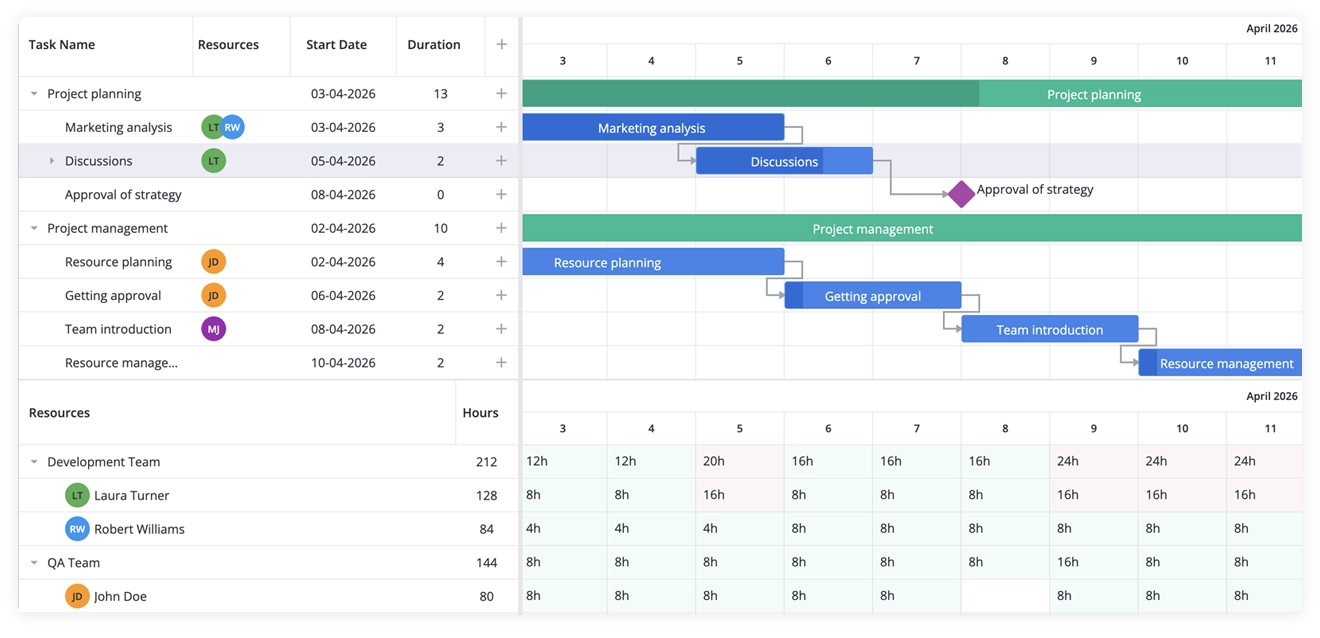
Resource load demo: React • Svelte • Vue
Resource load can be displayed in hours (default) or as a percentage, and you can customize the output using a template function. The calculation respects global, task, and resource calendars, so load values always reflect the actual working time.
🔹 Individual work-time calendars for tasks and resources
SVAR Gantt PRO now supports assigning calendars through the calendars prop. A task’s calendar controls its working-time rules and how the task is scheduled and displayed. Task bars automatically adjust to reflect the correct working days, while non-working days can optionally be highlighted through calendar-specific CSS classes.
<script>  const calendars = [    { id: "weekends", weekHours: { saturday: 8, sunday: 8 } }  ];
  const tasks = [    { id: 2, text: "Server maintenance", start: "2024-01-20", duration: 16, calendar: "weekends" }  ];</script>
<Gantt {tasks} {calendars} />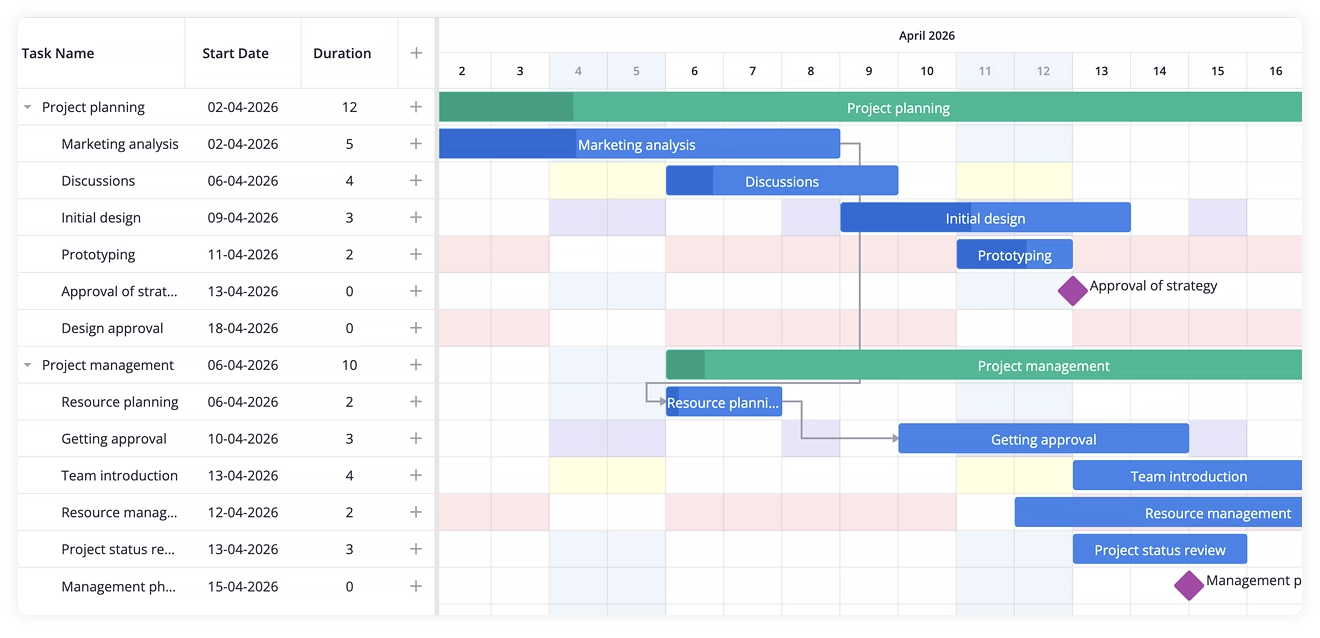
Calendars for tasks demo: React • Svelte • Vue
Each resource can also have its own work-time calendar. These calendars become visible when tasks are grouped by resource, showing non-working time for each resource’s row. Task bars keep the same width regardless of the resource’s schedule.
<script>  const calendars = [    { id: "part-time", weekHours: { monday: 4 } }  ];
  const resources = [    { id: "r1", name: "Bob", calendar: "part-time" }  ];</script>
<Gantt {resources} {calendars} />
Calendars for resources demo: React • Svelte • Vue
⚠️ Note: We have switched the calendar API from calendar instances to JSON notation. Now you should pass a JSON configuration object with the rules for global and individual calendars. This allows for proper serialization, e.g. during export to PDF.
🔹 Task grouping
Tasks can now be grouped by any field or by assigned resource, allowing users to explore the project by priority, status, or team. Grouping supports optional task and resource hierarchies and provides flexible handling for ungrouped tasks — you can place them at the top, at the bottom, or hide them entirely.
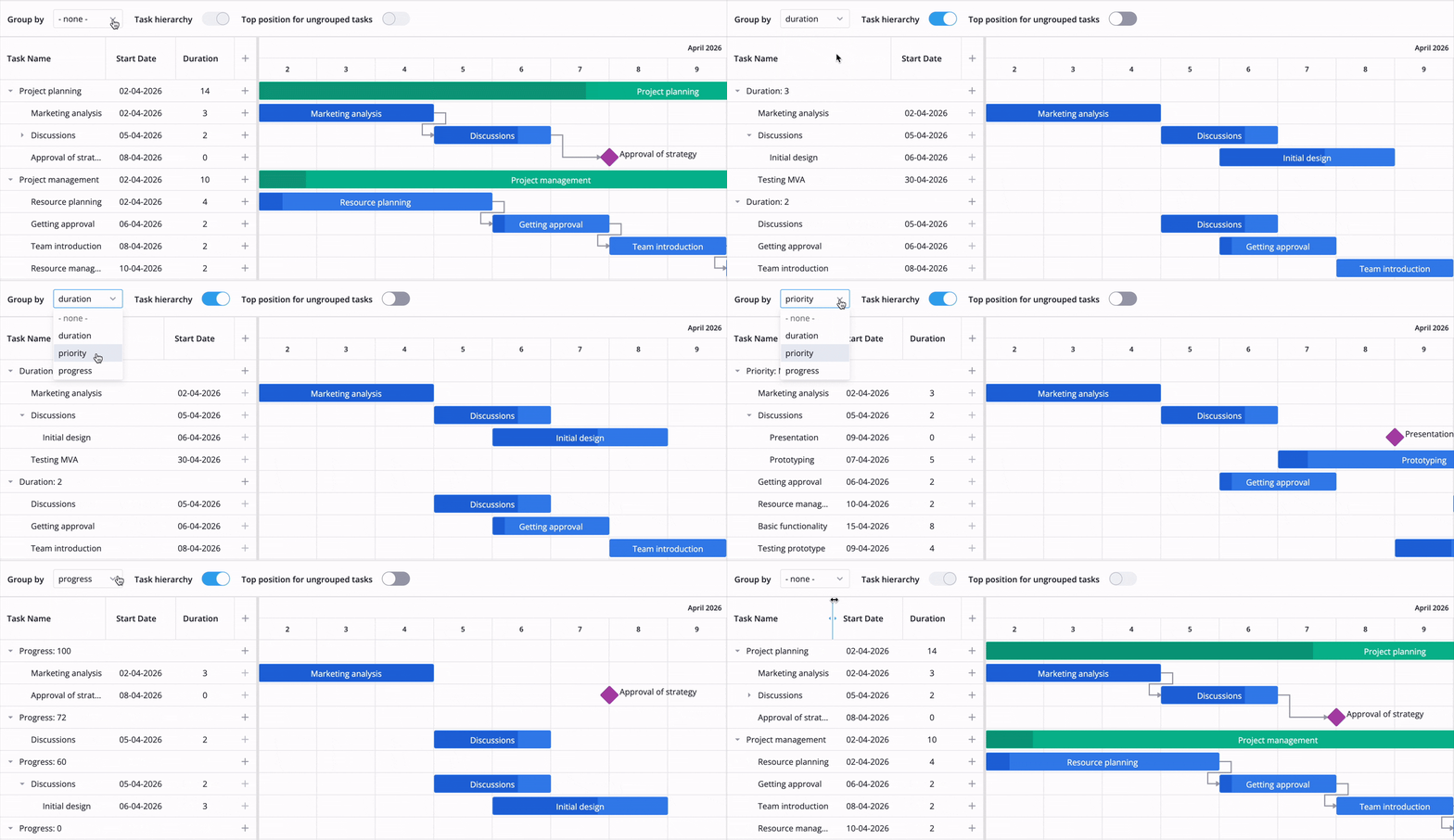
Task grouping demo: React • Svelte • Vue
🔹 Automatic WBS codes
SVAR Gantt PRO now supports automatic WBS (Work Breakdown Structure) numbering, assigning each task a hierarchical code based on its position in the task tree (e.g., 1, 1.2, 1.2.1). WBS codes update automatically whenever tasks are added, moved, indented, or reordered.
To enable WBS numbering, add the wbs prop to the Gantt component:
<Gantt {tasks} {links} {scales} wbs />When WBS is enabled, Gantt also adds a dedicated WBS column to display the task codes. You can customize it through the column configuration.
WBS codes demo: React • Svelte • Vue
🔹 Improved Editor UI
In this release, the task editor has been reorganized into focused tabs — General, Links, Resources, and Segments — so each aspect of a task can be edited without distraction.
We also improved editing of split tasks. When you click a segment of a split task, the Editor shows that you’re editing a segment and provides a link to switch to the full task view, so you can easily access all task-level parameters.
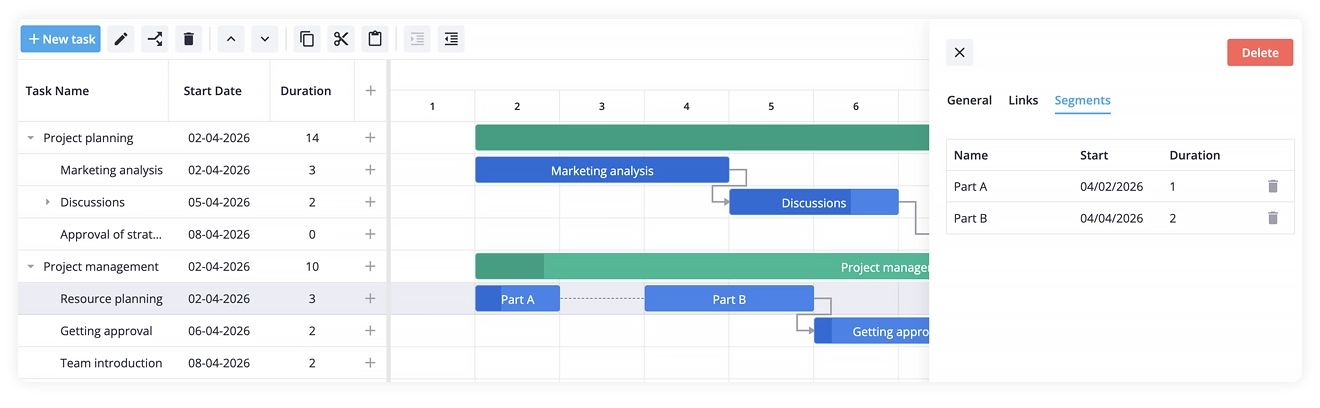
Segments editor demo: React • Svelte • Vue
🔹 Improvements in the Gantt scheduling engine
We have enhanced the Gantt auto-scheduling engine to work with summary tasks, which results in better performance and atomic scheduling operations that can be reverted with a single undo step.
Summing Up
SVAR Gantt 2.7 makes it easier to build modern project planning and scheduling tools with better performance, resource management, and more flexible task organization. With support for resource allocation, resource load visualization, individual calendars, task grouping, and automatic WBS codes, the PRO edition gives you the building blocks for serious project scheduling apps.
Learn more:
Start with the free open-source edition and upgrade to PRO when your project needs advanced resource planning and scheduling features. The PRO version is available for React, Svelte, and Vue, and early-bird pricing runs until June 14.
See pricing and get a free SVAR Gantt PRO trial:
This release ships alongside SVAR Core 2.6 and DataGrid 2.7, which adds a new Tooltip component, unified CSS styling, and multiselect filtering.