

SVAR Calendar vs FullCalendar
For many web developers, FullCalendar has been a widely used and trusted scheduling library for years. Its mature plugin ecosystem and broad feature set helped it become a standard in real-world projects.
But the frontend world keeps moving, and developers look around for solutions that fit better with the current frontend tooling. With React, Vue, and Svelte shaping how interfaces are built, engineers want components that are lightweight, integrate cleanly with modern frameworks, and don’t need additional layers to deliver core functionality.
React, Svelte and Vue versions of SVAR Calendar follow that approach. It focuses on providing a simpler, framework-native experience while covering the essential scheduling features most applications need. For many teams, that combination of modern design and a smoother development experience makes SVAR Calendar a strong alternative to FullCalendar.
What Makes a Good Calendar Component in 2026?
When developers talk about calendar components today, they expect far more than a widget that simply shows events. They’re looking for tools that can handle real workflows. If you browse discussions across Reddit threads and developer forums, you’ll see the same recurring pain points: too much manual wiring, too many workarounds, and not enough support for real scheduling logic.
All of this has pushed expectations higher and shaped a practical set of criteria for what a modern calendar module needs to support in 2026:
- Drag-and-drop scheduling — for intuitive planning and quick rescheduling.
- Multiple views — for supporting different planning styles and time scales.
- Built-in editing — for fast CRUD operations without having to design your own forms, dialogs, or interaction patterns.
- Recurring events — for handling repeating schedules in real products.
- Easy UI customization — for adapting the calendar to any design system.
- Filtering — for helping users focus on what actually matters.
- Resource scheduling — for booking, logistics, healthcare, and team-based workflows.
- TypeScript support — for safer collaboration and long-term maintainability.
- Native framework integration — for plugging directly into React, Vue, or Svelte with minimal boilerplate.
Both SVAR Calendar and FullCalendar deliver the core functionality modern teams expect. Where they differ is in how they approach integration, customization, and the workflows behind real scheduling tasks. These differences are what we’ll examine next.
SVAR Calendar vs FullCalendar: Core Capabilities
SVAR Calendar and FullCalendar meet the baseline expectations outlined in the previous section. They handle event rendering, support multiple views, offer drag-and-drop interactions, and perform reliably in production. Both come with free, MIT-licensed core and offer advanced features under the paywall. For most scheduling scenarios, either library can serve as a solid foundation.
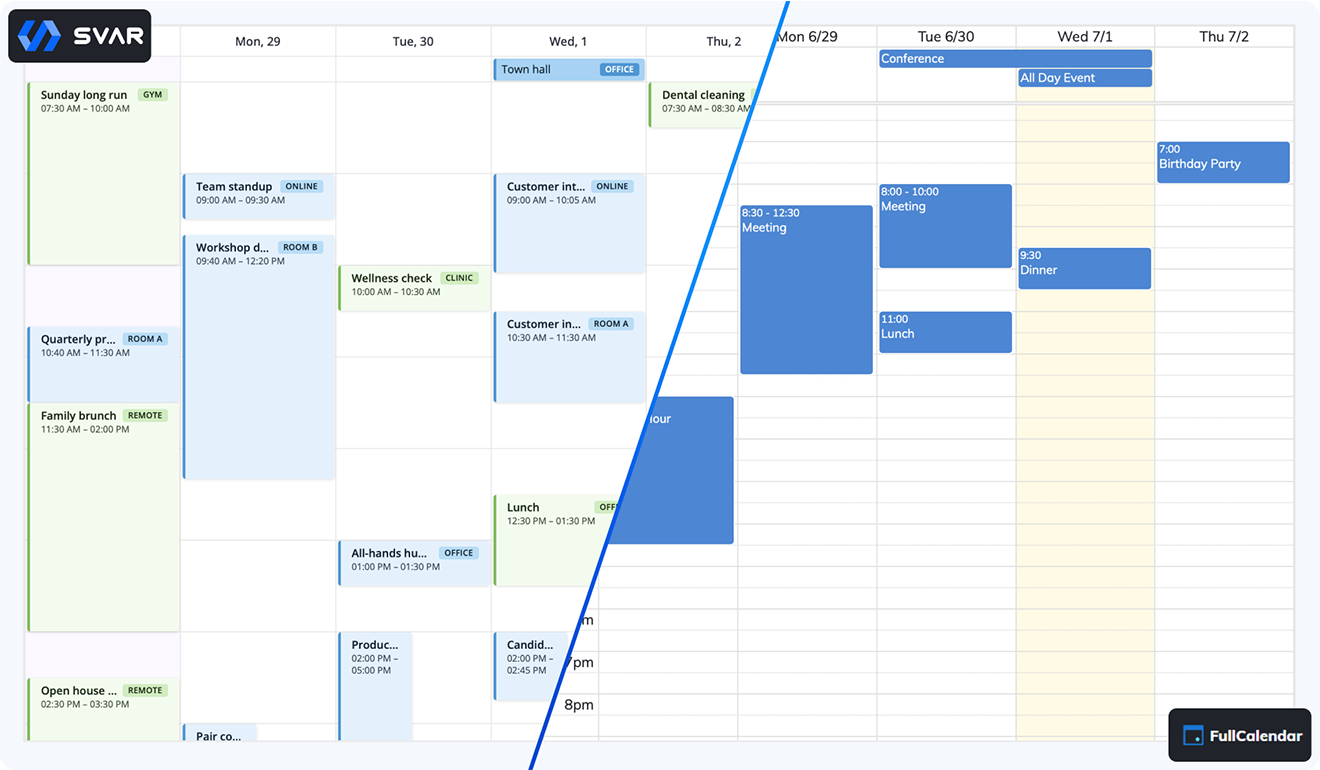
Where they really differ is in how these capabilities translate into everyday development workflows. SVAR Calendar ships with features like built-in grouping and an integrated event editor, allowing teams to implement common CRUD operations with minimal custom UI. Because these workflows are handled by the component itself, they cut down on the glue code developers have to write.
FullCalendar provides similar functionality through its plugin ecosystem or custom implementations. This gives teams flexibility, but it also means more decisions, more configuration, and more code to maintain — especially when assembling features that SVAR Calendar includes by default.
In short, both libraries deliver the core scheduling functionality modern teams expect. The meaningful differences emerge in how each one approaches integration, customization, and workflow design — topics we are going to explore in the next section.
| Capability | SVAR Calendar | FullCalendar |
|---|---|---|
| Multiple views (Day/Week/Month) | ✔️ | ✔️ |
| Drag-and-drop scheduling | ✔️ | ✔️ |
| Built-in event editing | ✔️ | ➖ |
| Calendar grouping | ✔️ | ➖ |
| Recurring events | ✔️ PRO (editable series) | ✔️ |
| Resource scheduling | ✔️ PRO | ✔️ Premium |
| Timeline View | ✔️ PRO | ✔️ Premium |
| Agenda (List) View | ✔️ PRO | ✔️ |
| Year View | ✔️ PRO | ✔️ |
| Filtering | ✔️ | ➖ |
| Mobile layout | ✔️ | ➖ |
| Undo/redo | ✔️ PRO | ➖ |
| Time zones | ✔️ PRO | ✔️ |
| Import & export | iCal import/export, Excel import; PDF, PNG & Excel export in PRO | iCal read-only plugin, print styles in Premium, no file export |
| TypeScript support | ✔️ | ✔️ |
| Integration with React, Svelte & Vue | Native | Wrappers |
SVAR Calendar vs FullCalendar: Key Differences
The real distinctions between SVAR Calendar and FullCalendar appear once you look beyond the shared feature set and examine how each library fits into modern development workflows. Their approaches to integration, customization, and scheduling logic lead to very different development experiences.
Integration Model
SVAR Calendar is built as native React, Vue, and Svelte components, designed to work directly with each framework’s rendering and state patterns. This eliminates most boilerplate and keeps UI and data naturally in sync.
import { useEffect, useRef, useState } from "react";import { Calendar, Editor, Willow } from "@svar-ui/react-calendar";
const date = new Date(2026, 8, 14);
const events = [  {    id: 1,    start: new Date(2026, 8, 14, 9, 0),    end: new Date(2026, 8, 14, 10, 0),    text: "Standup",  },];
export default function App() {  const api = useRef(null);  const [ready, setReady] = useState(false);
  useEffect(() => {    if (api.current) setReady(true);  }, []);
  return (    <Willow>      <Calendar ref={api} events={events} date={date} />      {ready && <Editor api={api.current} />}    </Willow>  );}
FullCalendar uses a core JavaScript engine wrapped by framework adapters. The wrappers work reliably, but they introduce extra wiring, more configuration, and additional state-sync logic in complex applications.
import FullCalendar from "@fullcalendar/react";import dayGridPlugin from "@fullcalendar/daygrid";import interactionPlugin from "@fullcalendar/interaction";
const events = [  { title: "Kickoff", date: "2026-07-01" }];
export default function App() {  return (    <FullCalendar      plugins={[dayGridPlugin, interactionPlugin]}      initialView="dayGridMonth"      events={events}    />  );}
What this means in practice: SVAR feels like part of the framework; FullCalendar behaves like an external library you integrate.
Customization Approach
SVAR Calendar focuses on straightforward customization through CSS variables, built-in themes, and predictable component APIs. Most UI adjustments can be made without deep overrides.
FullCalendar offers flexible but lower-level customization through rendering hooks, event callbacks, and plugin APIs. This enables advanced scenarios but often requires more code and more knowledge of the internal engine.
What this means in practice: SVAR is optimized for fast customization; FullCalendar offers flexibility at the cost of complexity.
Editing Workflows
SVAR Calendar ships with an event editor, so teams get ready-to-use CRUD workflows. Drag-to-create, moving, and resizing events work out of the box.
Adding the Editor component enables a customizable event form, with changes handled through the same action pipeline as drag-and-drop operations. Since version 2.7, the editor also supports rich-text fields and file attachments.

FullCalendar provides the events and hooks, but editing UIs must be implemented manually or assembled from plugins. This gives freedom but increases development time.
What this means in practice: SVAR provides a complete editing workflow; FullCalendar provides the primitives.
Business Scheduling Features
SVAR Calendar supports features aimed at real scheduling systems, such as:
- Calendar grouping
- Resource management
- Event filtering
- Timezone support
These capabilities reduce the need for custom logic in business apps like booking systems, logistics dashboards, and internal tools.
FullCalendar supports similar scenarios, but often through plugins, custom implementations, or additional configuration, depending on the complexity of the workflow.
What this means in practice: SVAR ships with business-ready scheduling tools; FullCalendar requires more assembly.
Ecosystem and Extensibility
SVAR Calendar focuses on a cohesive, framework-native experience with built-in workflows and predictable extension points.
FullCalendar offers a large, mature plugin ecosystem, giving developers many ways to extend the core engine — though often with more integration overhead.
What this means in practice: FullCalendar has the larger ecosystem; SVAR has the more integrated one.
This table highlights the architectural and workflow differences that matter most when choosing between the two.
| Category | SVAR Calendar | FullCalendar |
|---|---|---|
| Primary focus | Full scheduling system for business apps | Calendar engine with extensible plugins |
| React integration | Native | Wrapper |
| Vue integration | Native | Wrapper |
| Svelte integration | Native | ➖ |
| Angular integration | ➖ | Wrapper |
| TypeScript support | ✔️ | ✔️ |
| Custom event rendering | Custom React, Svelte or Vue components | Callback-based rendering (JSX/slots) |
| Customization approach | CSS variables, themes, component props | Hooks, callbacks, plugins |
| Learning curve | Lower | Higher |
| Pricing | Free core, Commercial (from $599) | Free core, Commercial (from $480) |
| Best fit | React, Svelte or Vue apps that need production-ready scheduling — built-in editing, resource management, and filtering out of the box | Projects that need a flexible calendar engine with plugin extensibility and multi-framework or Angular support |
Which One Should You Choose?
After looking at expectations, core capabilities, and architectural differences, the choice between FullCalendar and SVAR Calendar comes down to the kind of product you’re building and how much scheduling logic you need out of the box.
You should choose FullCalendar if:
- You rely on a mature plugin ecosystem and want access to many community extensions.
- Your team already uses FullCalendar and has existing integrations or internal components built around it.
- You need specific plugins that only FullCalendar’s ecosystem provides.
- You’re building highly custom, non-standard scheduling logic where low-level control matters more than built-in workflows.
You should choose SVAR Calendar if:
- You’re building applications in React, Vue, or Svelte and want components that feel native to your framework.
- You prefer framework-native components with predictable state handling and minimal boilerplate.
- You need ready scheduling workflows out of the box — event editing, filtering, grouping, resource, and timeline views.
- You want built-in editing and filtering features without assembling your own UI from scratch.
In practice, FullCalendar is a strong choice when you need a flexible calendar engine, while SVAR Calendar is the better fit when you need a full scheduling system that integrates cleanly with modern frontend frameworks.
Conclusion
Across all core capabilities, SVAR Calendar and FullCalendar overlap on the fundamentals: event rendering, multiple views, drag-and-drop interactions, and reliable performance. The real difference lies in their purpose.
FullCalendar is a calendar engine — powerful, flexible, and backed by a long-standing ecosystem. It excels at displaying events and giving developers low-level control over scheduling logic.
SVAR Calendar, on the other hand, is a full scheduling system. It combines multiple calendar views, built-in editing workflows, filtering, resource management, and framework-native integration into a single component. For teams working in React, Vue, or Svelte, it offers a more cohesive, modern architecture with significantly less boilerplate.
If you want to explore SVAR Calendar in your framework of choice, just pick one and dive in:
You can find the free version of SVAR Calendar on GitHub and start building production-ready scheduling UIs within minutes!