

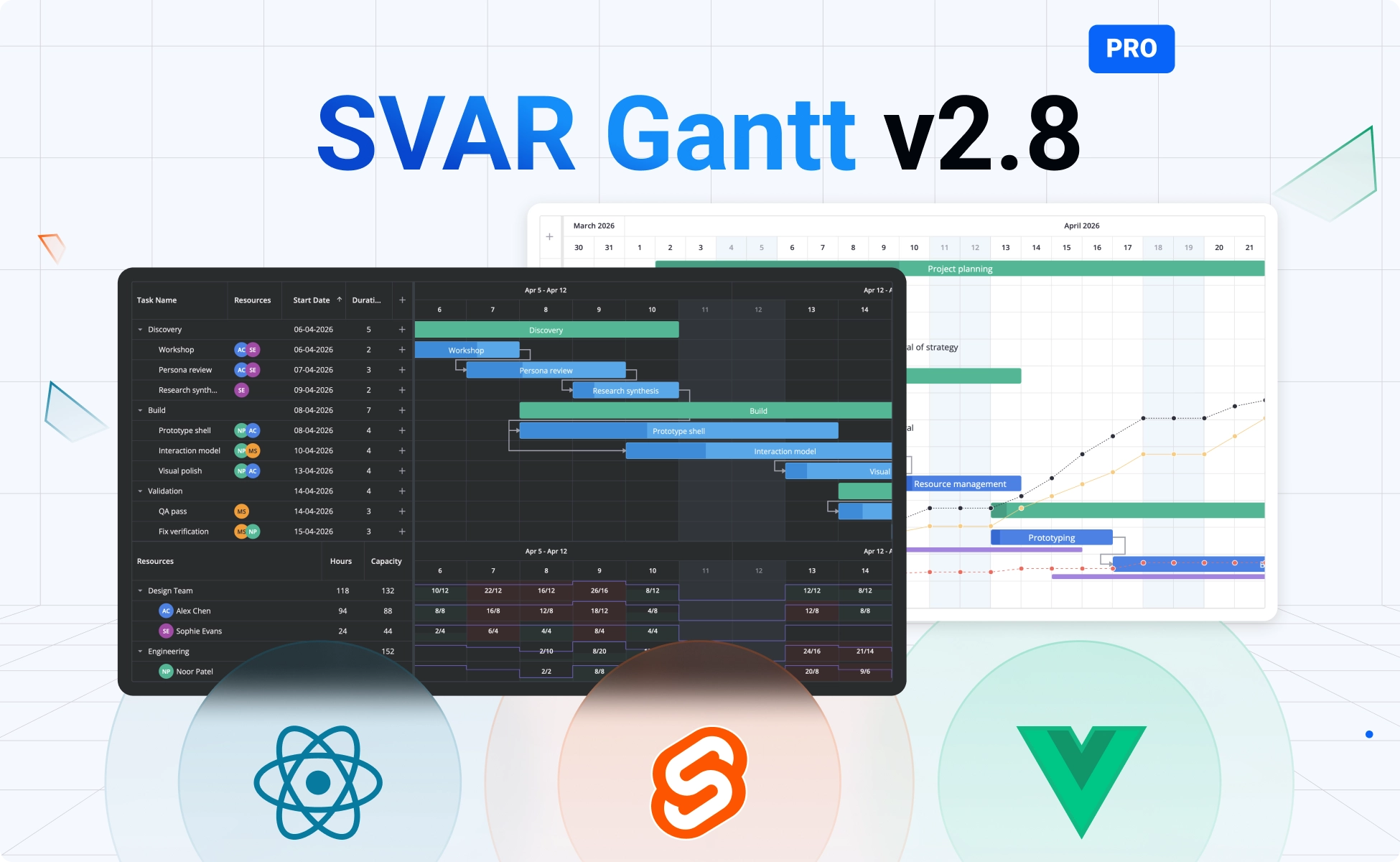
We’re excited to announce version 2.8 of the SVAR Gantt chart components for React, Vue, and Svelte. This release makes the scheduling engine more than a display layer: it now handles many of the scheduling scenarios project managers deal with in real projects. With this update, SVAR Gantt PRO becomes a stronger tool for project planning and resource allocation.
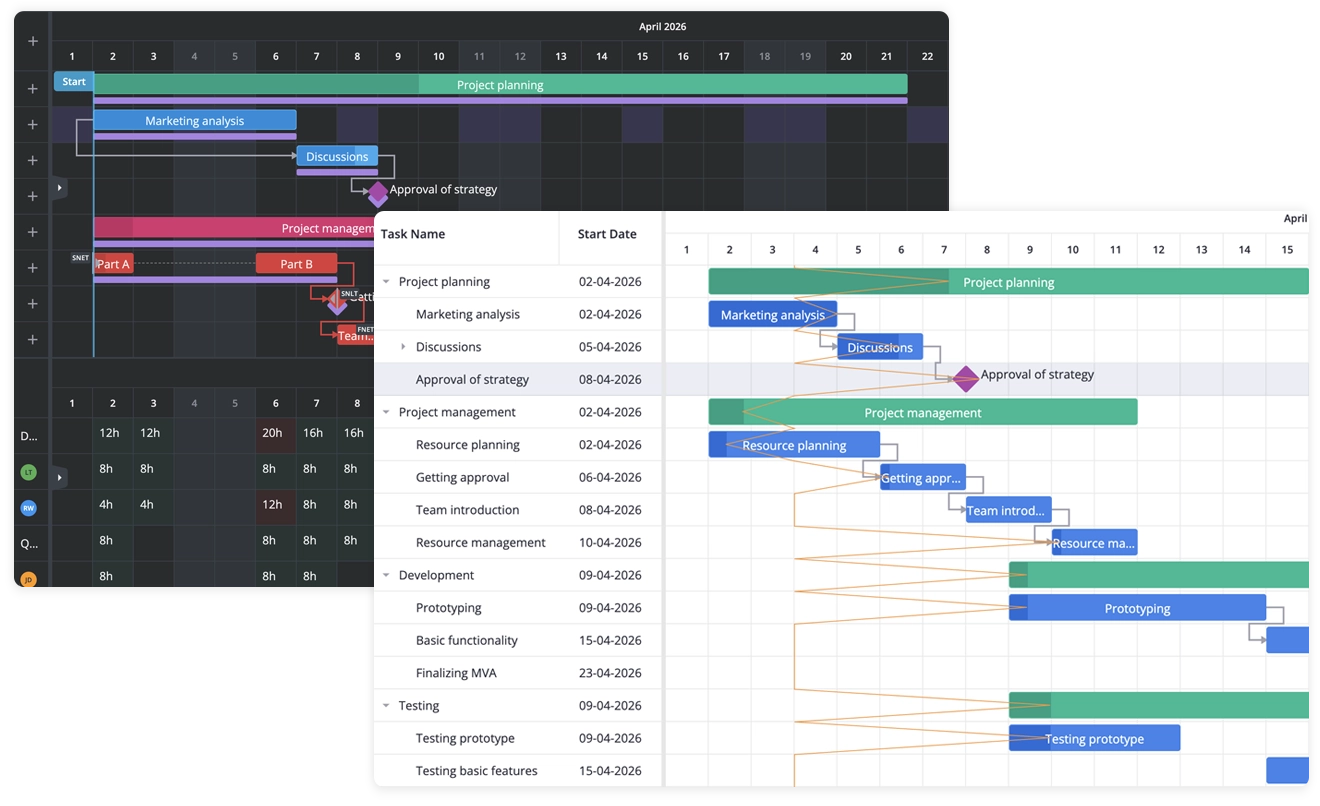
In version 2.8, we introduce an upgraded scheduling engine that takes auto-scheduling in SVAR Gantt PRO to the next level:
- Auto-scheduling across all four dependency types: FS, SS, FF, and SF.
- Critical path and slack now calculated based on all dependency types.
- Six scheduling constraints set the boundaries a plan must respect.
- Resource-driven scheduling calculates task dates from the working calendars of assigned people.
- Faster scheduling for auto-scheduling and critical path, which now run much faster with thousands of tasks.
To make SVAR Gantt a more complete tool for project management and resource planning, we also added:
- Extended resource planning with a resource histogram and drag-and-drop resource assignment.
- New project tracking features, such as the progress line and S-curve.
- Sub-grid panel for task details shown to the right of the Gantt chart.
- Real-time server updates that support multi-user editing and collaboration.
🔹 View demos for v2.8: React Gantt • Vue Gantt • Svelte Gantt
The following sections cover what ships in SVAR Gantt PRO. The MIT edition also gains three features of its own, listed at the end.
Upgraded Scheduling Engine
We’ve upgraded the scheduling engine of SVAR Gantt PRO to provide automatic scheduling logic for project planning:
All four link types in auto-scheduling and the critical path
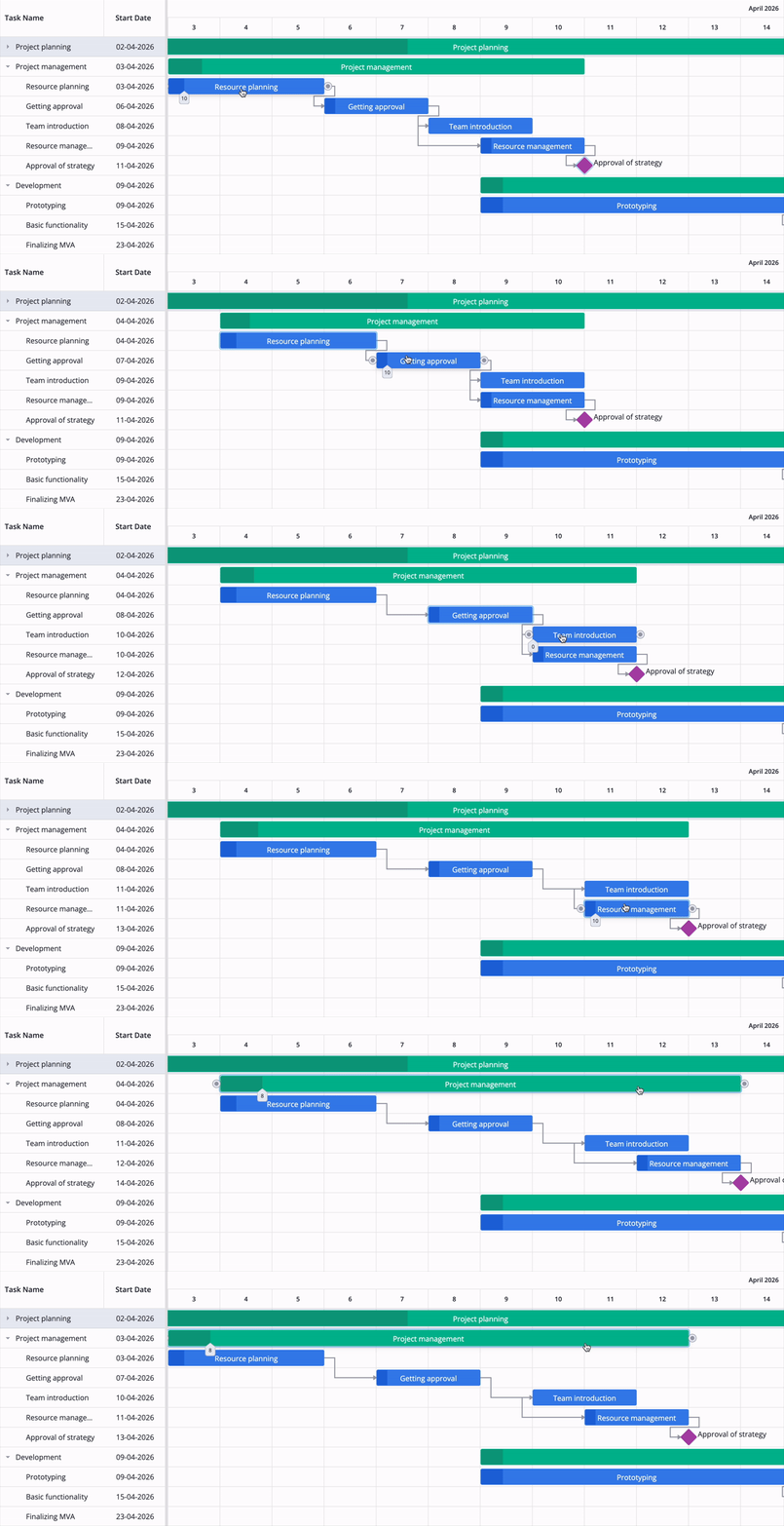
Auto-scheduling previously supported only Finish-to-Start links, but in 2.8 we added support for Start-to-Start, Finish-to-Finish, and Start-to-Finish links, with lag applied to every link type. All four link types now affect dates, slack, and the critical path, which means overlapping work can be planned as it happens in real projects. When a linked task changes, the engine always recalculates the dates of its dependent tasks.
👉 Auto-scheduling demo: React • Svelte • Vue
Manual and inactive tasks
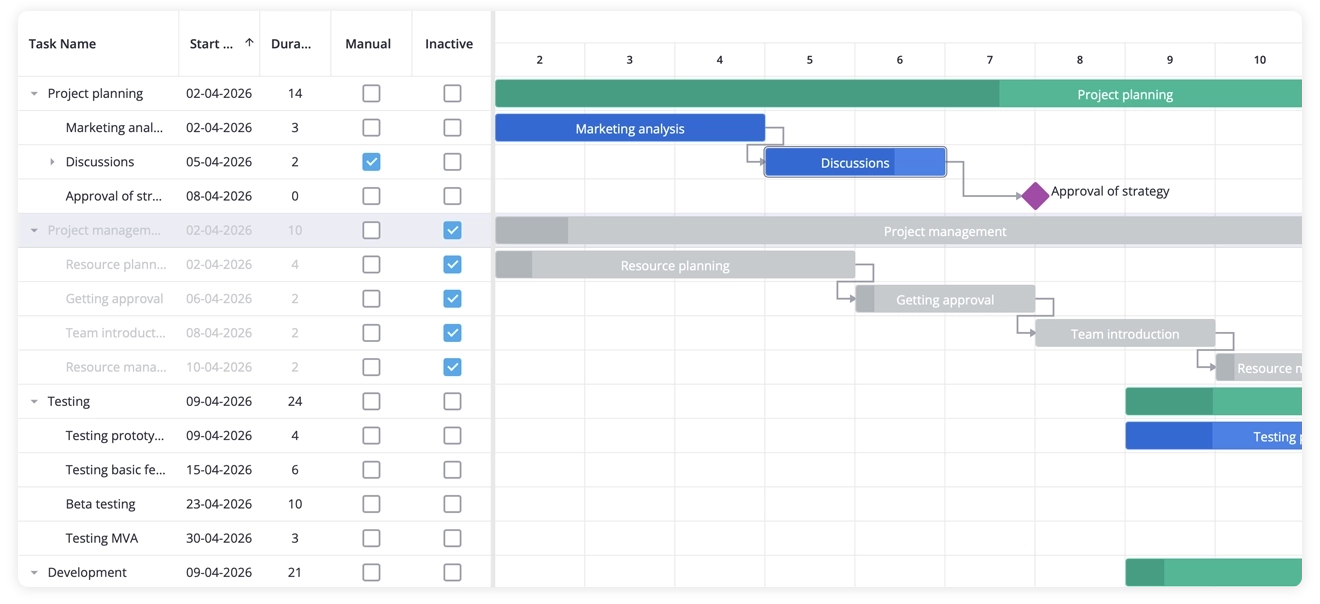
For more flexibility, we also added two task modes that take tasks out of auto-scheduling: manual and inactive tasks. Manual tasks are locked in place: auto-scheduling never moves them, while users can still drag them manually. This separates committed work from work that is still being planned.
Inactive tasks represent work that has been cancelled or put on hold. The inactiveTasks feature enables support for inactive tasks in the grid and editor; to make a specific task inactive, set its inactive field to true. Marking a task as inactive keeps it visible on the chart while removing it from scheduling, the critical path, resource load, and progress tracking. An inactive task no longer affects the plan, but you can reactivate it if the work resumes.
👉 Manual and inactive tasks demo: React • Svelte • Vue
Scheduling constraints
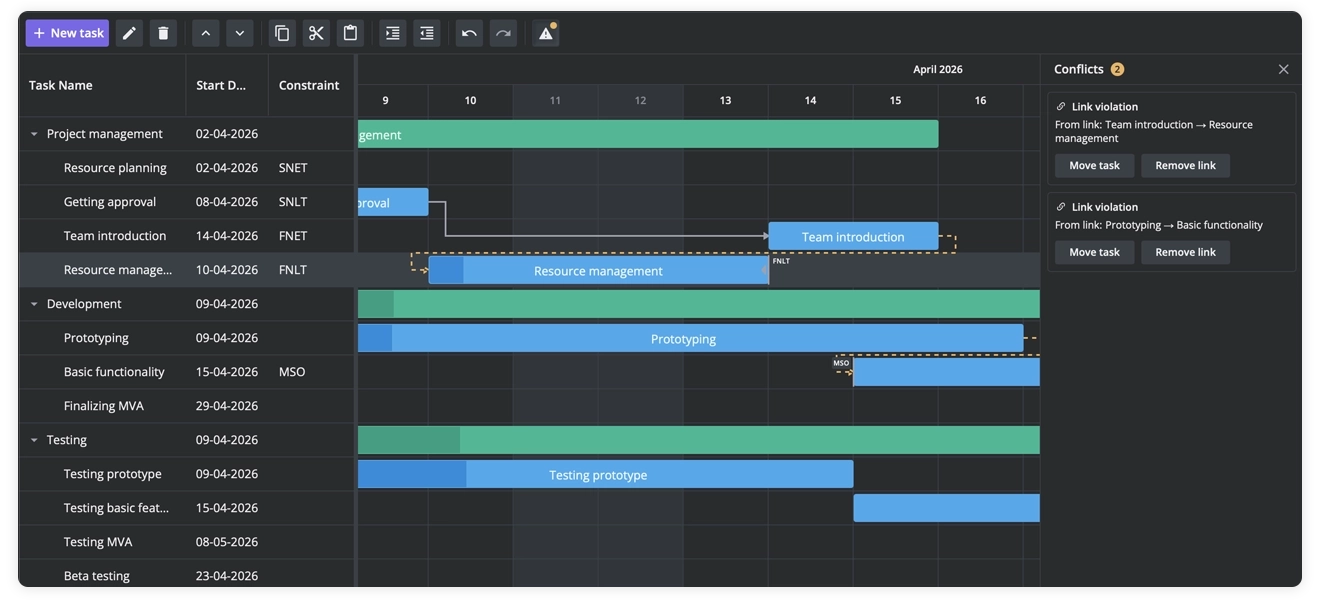
Tasks can carry the six constraint types that planning tools are expected to support: “Start no earlier than”, “Start no later than”, “Must start on”, “Finish no earlier than”, “Finish no later than”, and “Must finish on”. They are set per task in the constraint field as snet, snlt, fnet, fnlt, mso, and mfo, with the date next to the type.
In SVAR Gantt v2.8, constraints are a new feature and are treated as inputs to the scheduling calculation. Auto-scheduling (schedule={{ auto: true }}) respects constraints together with links, so a plan is built around delivery windows and contract milestones instead of being adjusted manually. Constraints are saved to the server like any other task data, which means they survive a reload and travel with the project.
👉 Constraints demo: React • Svelte • Vue
Handling scheduling conflicts
When a constraint or link can’t be satisfied, the chart no longer leaves users guessing why. The conflict list shows which task is affected and what is blocking it, and offers one-click fixes: reschedule the task, move it, remove the constraint, or remove the link.
Deadlines
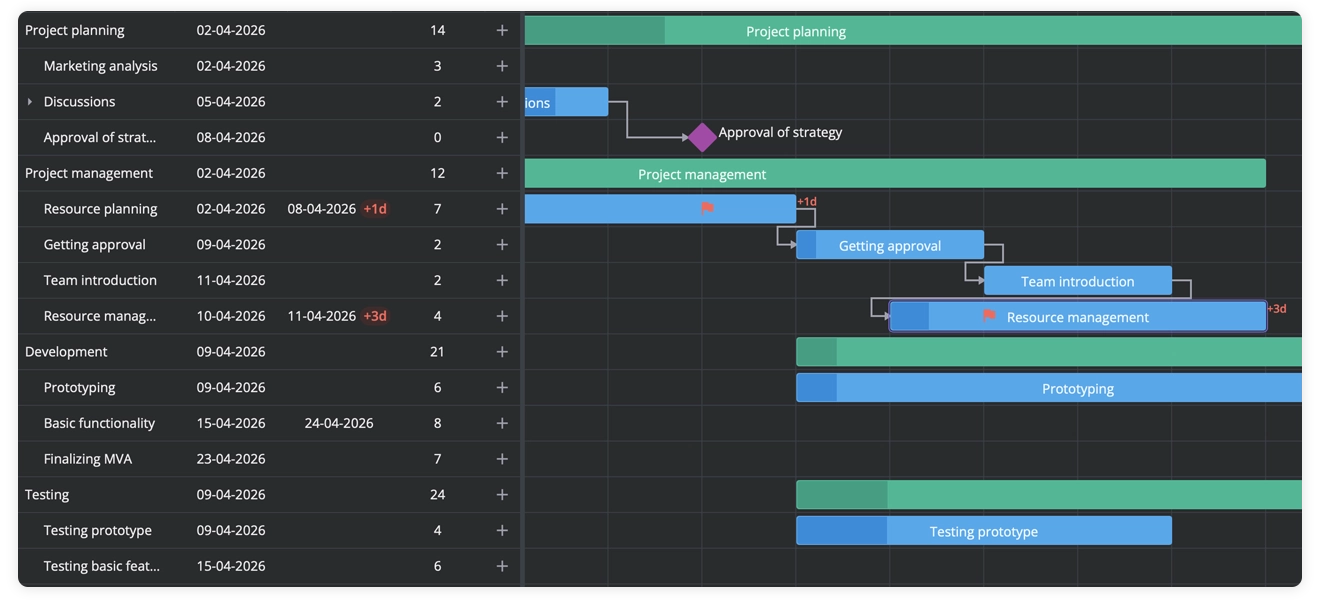
Each task can have a deadline – a target finish date that, unlike an FNLT constraint, never constrains the schedule. It’s marked on the chart with a flag that turns into a warning when the task runs late. This allows users to see which tasks will miss their dates directly on the timeline.
You can set a task deadline using the deadline field and enable deadline flags on the chart with the deadlines property.
👉 Deadline demo: React • Svelte • Vue
High performance with thousands of tasks
We’ve optimized performance for auto-scheduling and critical path calculation scenarios. Now SVAR Gantt performs well with thousands of tasks even with auto-scheduling enabled. When a user drags a task, all linked tasks are recalculated and moved accordingly. Dragging and editing stay smooth in large projects with many dependencies.
👉 Auto-scheduling demo with 100,000 tasks: React • Svelte • Vue
What’s New in Resource Planning
Together with the scheduling engine, we’ve extended the resource planning capabilities of SVAR Gantt PRO.
Resource-driven scheduling
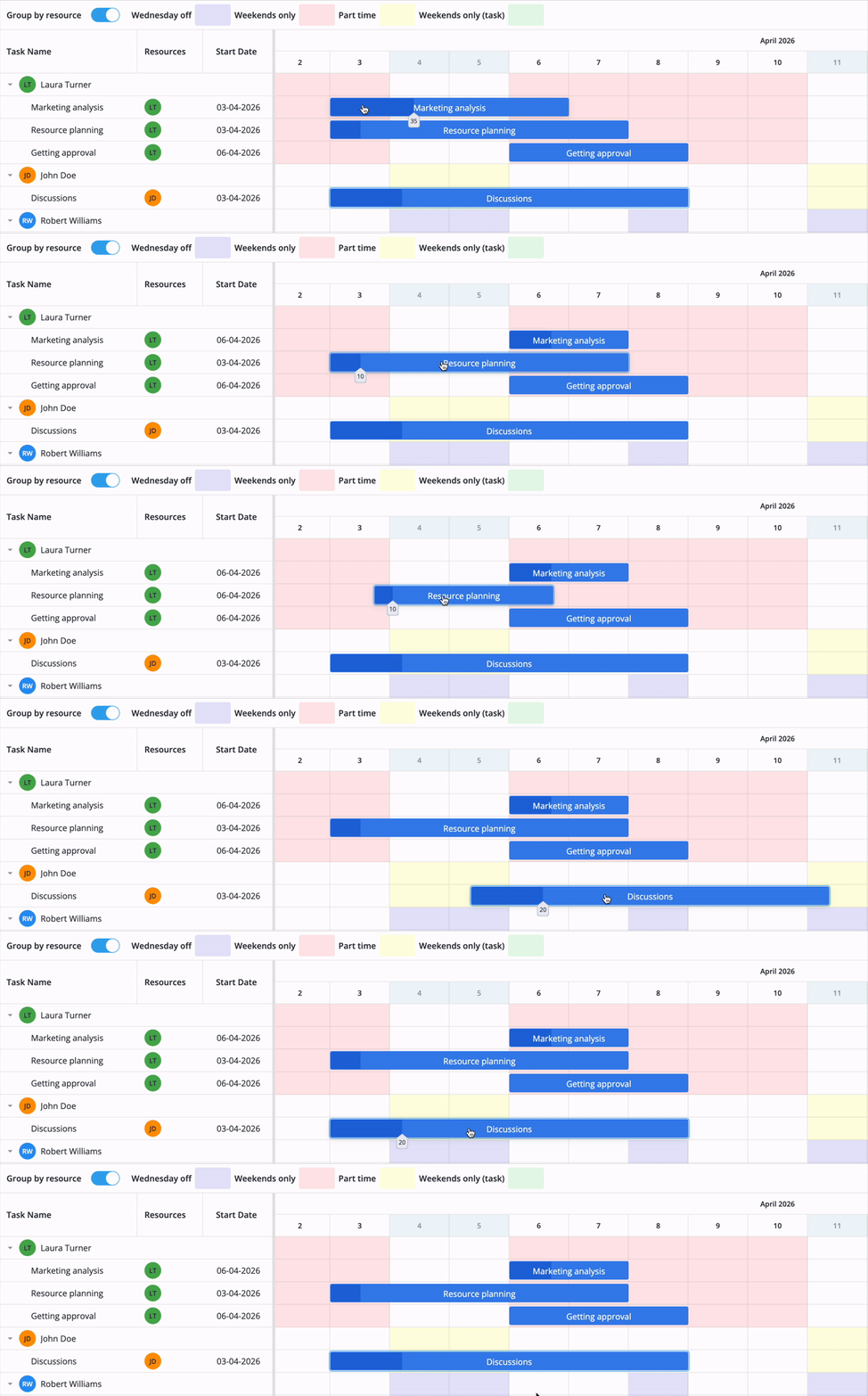
Resource-driven scheduling is part of the same scheduling engine in SVAR Gantt PRO 2.8 and is enabled with schedule.resourceCalendars. Task dates are calculated from the task calendar (falling back to the global calendar) combined with the resource calendars of the assigned people. The task works on a day when its task calendar allows it and at least one assigned resource is available, so one person’s day off doesn’t pause the task.
👉 Resource calendars demo: React • Svelte • Vue
Resource histogram
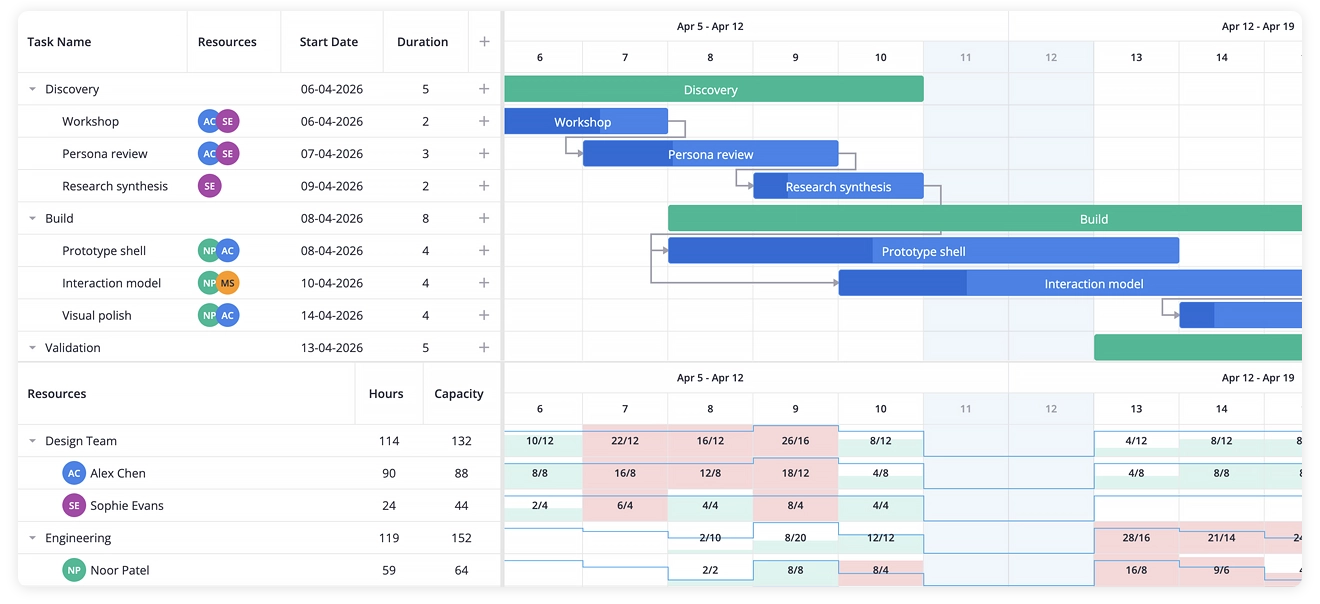
The histogram is a capacity chart: over-allocated people and periods are visible immediately, making it quicker to read than hour numbers spread across cells. It is supplied with a tooltip and adjusts to the chart’s zoom level, so workload remains easy to understand across different project timeframes.
👉 Resource histogram demo: React • Svelte • Vue
Drag-and-drop assignment
People can be dropped onto tasks from a list or from the resource load view, and tasks can be moved between resource groups to reassign them. Staffing a plan takes a few drags instead of a form for each task, and because assignments feed the scheduling engine, both dates and the load view update as you work.
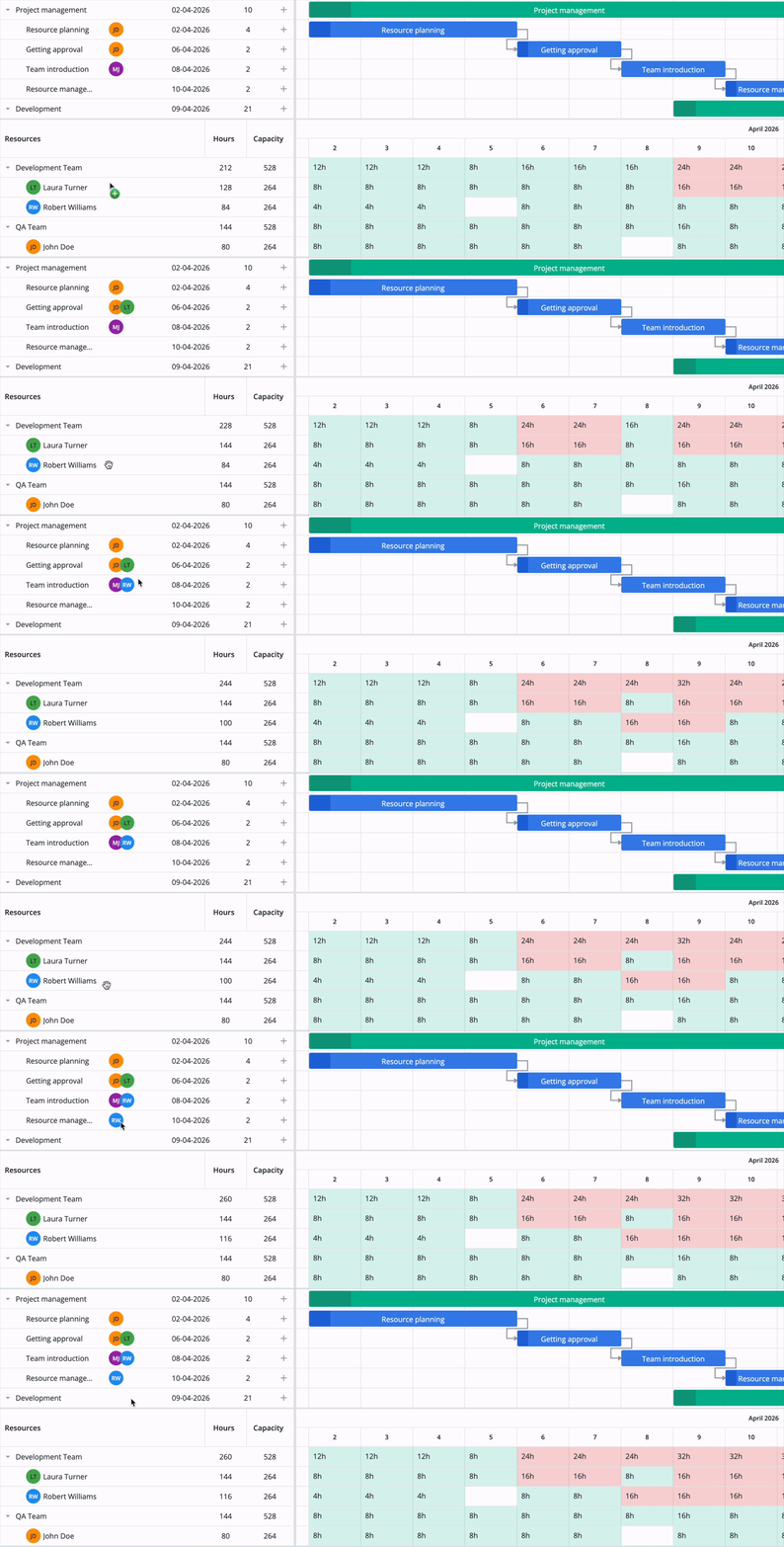
👉 Drag assignments from resource load demo: React • Svelte • Vue
Project Tracking and Editing
Version 2.8 of SVAR Gantt PRO also brings new features that help users track projects and act quickly when there are delays:
Progress line
SVAR Gantt PRO 2.8 now supports a progress line that compares each task’s reported progress against a status date - today or any date you choose. It can be enabled with the progressLine property and shows which tasks are ahead of schedule and which are behind, giving a quick overview of project status.
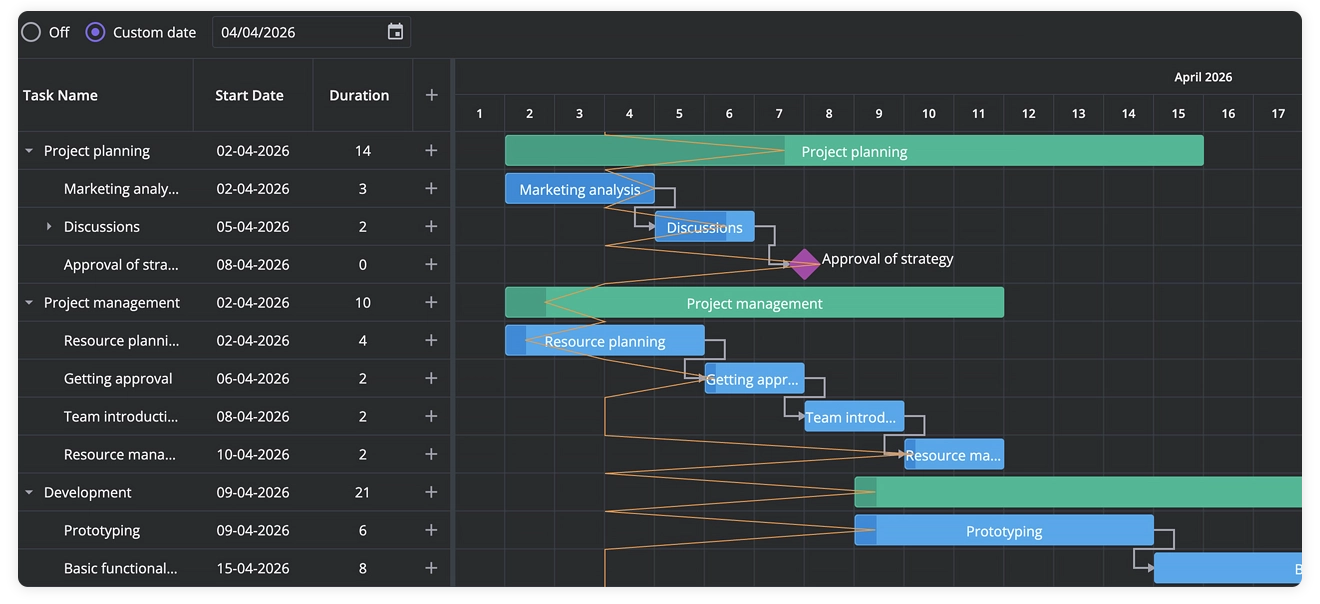
👉 Progress line demo: React • Svelte • Vue
S-curve
Cumulative planned, actual, and baseline progress is shown as curves over the timeline using the sCurve feature (scheduled, earned, and baseline curve types). Each curve rises from 0% to 100%, with values displayed on hover. This lets you compare plan and reality across the whole project inside the component instead of exporting data and charting it elsewhere.
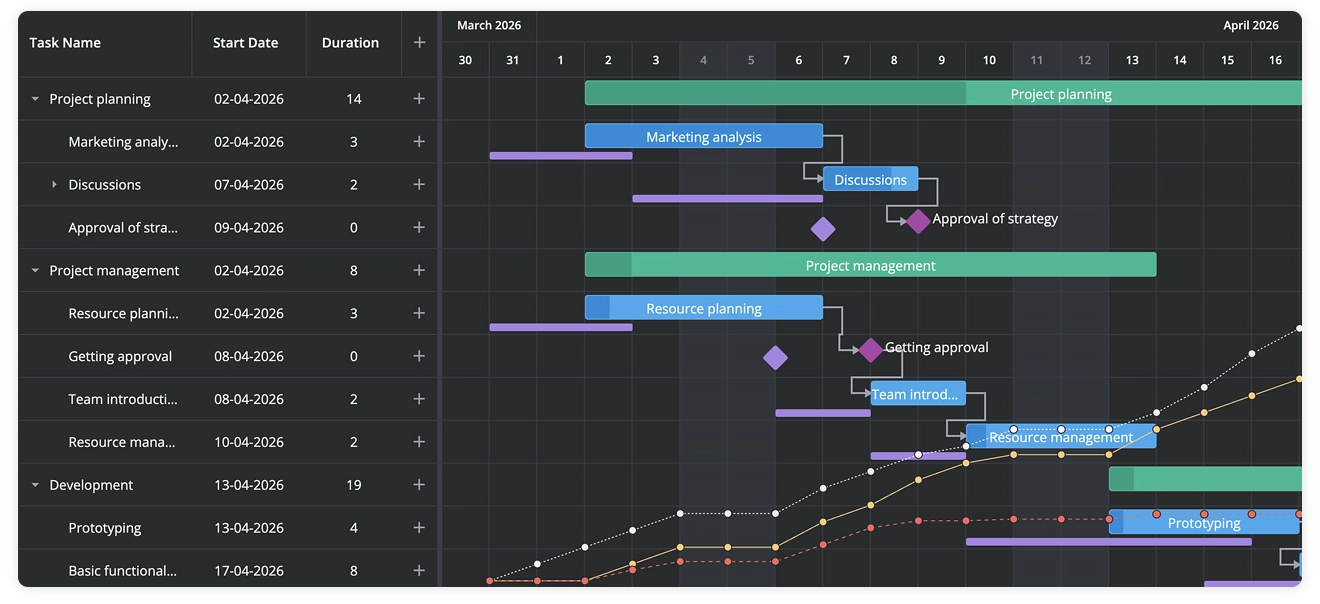
👉 S-curve demo: React • Svelte • Vue
Secondary grid panel
Task details such as status or cost can now be shown in a separate grid panel (a column with section: "subGrid") to the right of the timeline rather than in a column of the main grid, keeping the task table readable while extra fields stay one glance away. The panel can be resized, collapsed, or hidden, and the layout adapts to narrow screens.
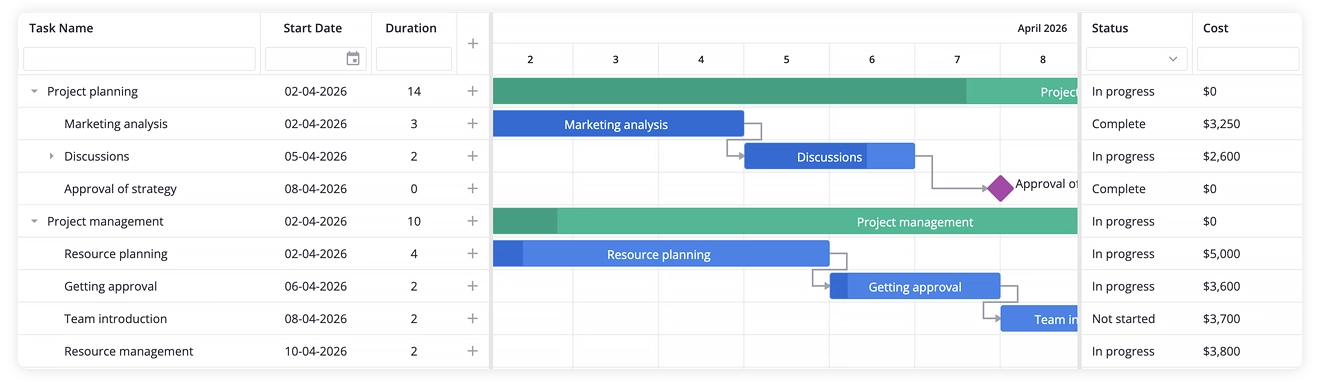
👉 Sub-grid panel demo: React • Svelte • Vue
Placeholder row
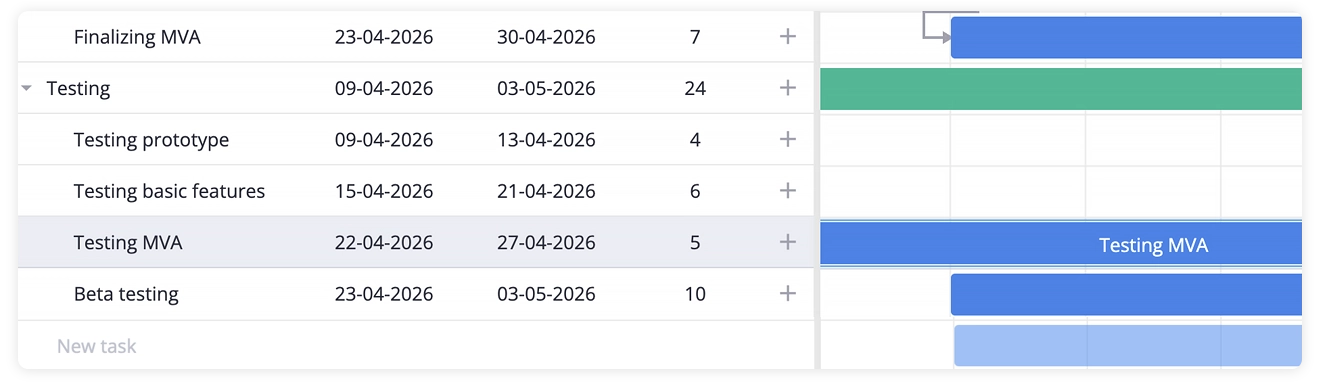
From now on, Gantt users can quickly add tasks with a placeholder row at the bottom of the grid. The placeholderRow property adds an empty row below the real tasks, where users create a task without opening the task editor: by filling in an inline-editable grid cell, or by drawing the task directly on the chart.
The same drag-to-schedule interaction now works for unscheduled tasks as well: you can drag across a task’s empty row to schedule it.
👉 Placeholder row demo: React • Svelte • Vue
Export with resources and assignments
Resources and assignments are now included in exports to PDF, PNG, and Excel, as well as in MS Project import/export. This means project files retain both the schedule and resource assignments, making it easier to move projects between tools without rebuilding the team setup manually.
👉 Data export demo: React • Svelte • Vue
What’s New in the Open-Source Edition
The free edition of SVAR Gantt also received a few major updates:
Inclusive end dates
By default, SVAR Gantt displays the task end date as the start of the next day. The new inclusiveEnd property allows you to render tasks the way business users count days: a five-day task that starts on Monday now can be shown as “Monday to Friday,” not “Monday to Saturday”. The same convention applies in the grid, task editor, and tooltips.
👉 Inclusive end dates demo: React • Svelte • Vue
Drag tasks from outside
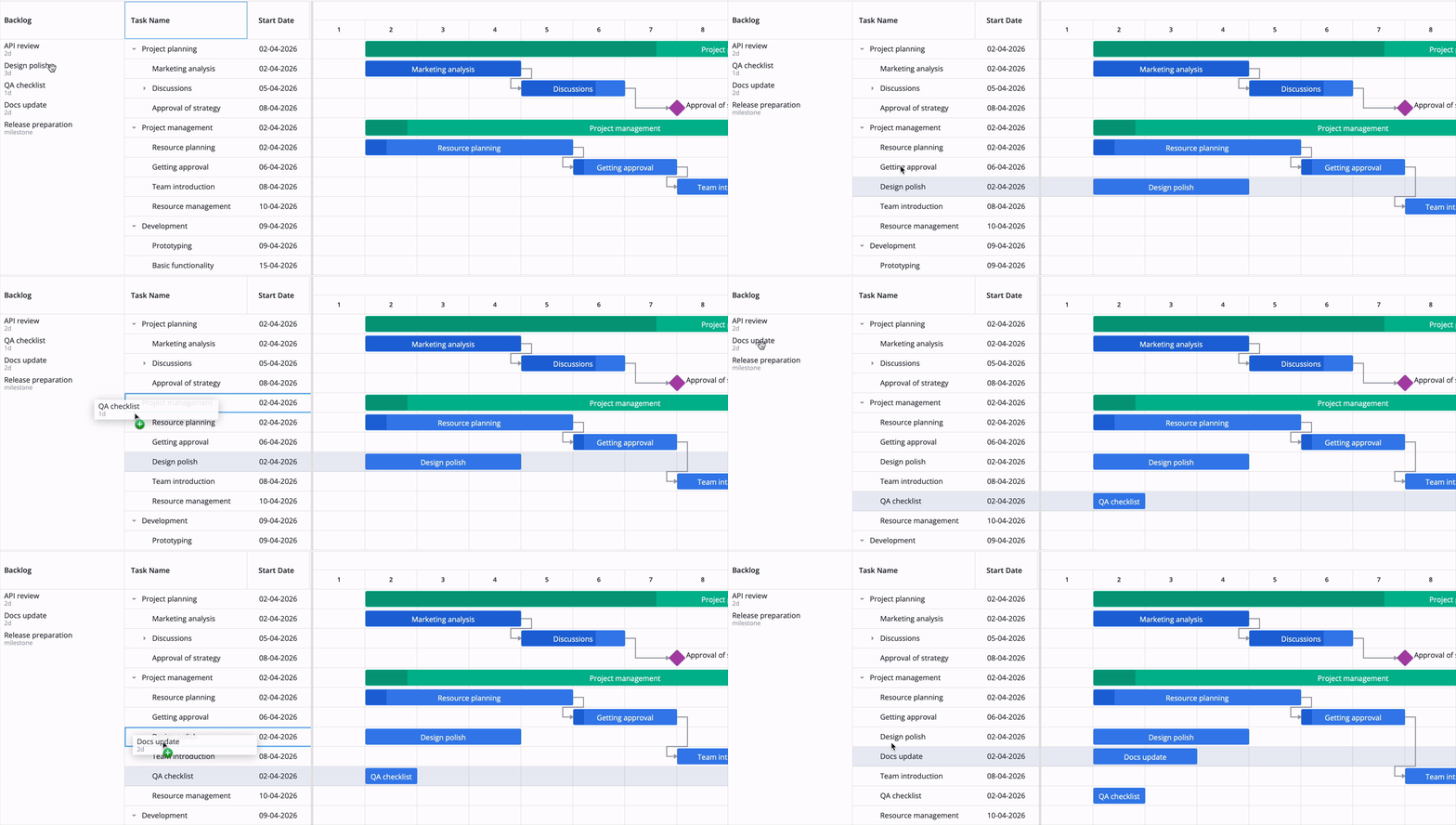
If you have a list of tasks, you can now drag them onto the Gantt chart to make backlog items become planned work. A dropped task is placed next to the task it was dropped on, or inside it when the target is a summary task, so a backlog turns into a plan without retyping tasks or rebuilding links.
👉 Drag tasks from outside demo: React • Svelte • Vue
Real-time updates from the server
RemoteEvents, a service introduced in this release, applies changes saved by other users to the Gantt live, which makes collaborative work possible.
Several users can now edit the same project and see each other’s changes live without refreshing the page. If the connection drops, the event stream reconnects on its own and signals that the data should be reloaded, so a session survives a flaky network.
👉 Multi-users demo with real-time updates: React • Svelte • Vue
All three versions of SVAR Gantt — Svelte, React, and Vue — are available on GitHub. If SVAR Gantt becomes part of your workflow, starring the repository is a simple way to support the project and influence what we build next 🌟
Try SVAR Gantt 2.8
The free MIT-licensed edition of SVAR Gantt provides a complete Gantt core, and version 2.8 adds inclusive end dates, real-time updates, and the ability to drag tasks in from your own list. Install the component via npm for React, Vue, or Svelte:
npm install @svar-ui/react-ganttnpm install @svar-ui/vue-ganttnpm install @svar-ui/svelte-ganttSVAR Gantt PRO 2.8 adds the upgraded scheduling engine with support for all four link types, six constraint types, deadlines, and task dates calculated from resource calendars. Resource planning is also easier with the new resource histogram and drag-and-drop assignment.
For project tracking and day-to-day editing, version 2.8 adds a progress line, S-curve, secondary grid panel, placeholder row, and exports that include resources and assignments.
Try SVAR Gantt PRO with all the new features with a free 30-day trial:
React Gantt • Vue Gantt • Svelte Gantt
…and stay in control of your tasks and projects :)