

Introduction
AI-assisted coding has revolutionized how developers work, but there’s a persistent frustration: LLMs are always one step behind. Ask your AI assistant about yesterday’s library update, and you’ll likely get outdated suggestions or incorrect API usage. The model simply doesn’t know about changes that happened after its training cutoff.
The Model Context Protocol (MCP), introduced by Anthropic, addresses this by giving AI systems a direct, standardized way to access external data sources. With MCP, an assistant can retrieve up-to-date documentation, examples, and configuration details in real time—keeping its suggestions aligned with the current state of your tools.
This article focuses on creating an MCP server for SVAR React Gantt, a real-world implementation that demonstrates how to bridge the gap between static AI knowledge and rapidly evolving library documentation.
Note: We’re also working on extending the scope to the rest of SVAR components.
What’s The Concept of MCP?
In general, to understand the role of Model Context Protocol (MCP), it is enough to read a quote from its creators:
💬 “Think of MCP like a USB-C port for AI applications. Just as USB-C provides a standardized way to connect electronic devices, MCP provides a standardized way to connect AI applications to external systems.”
Sounds simple? Well, let’s delve into the technical details.
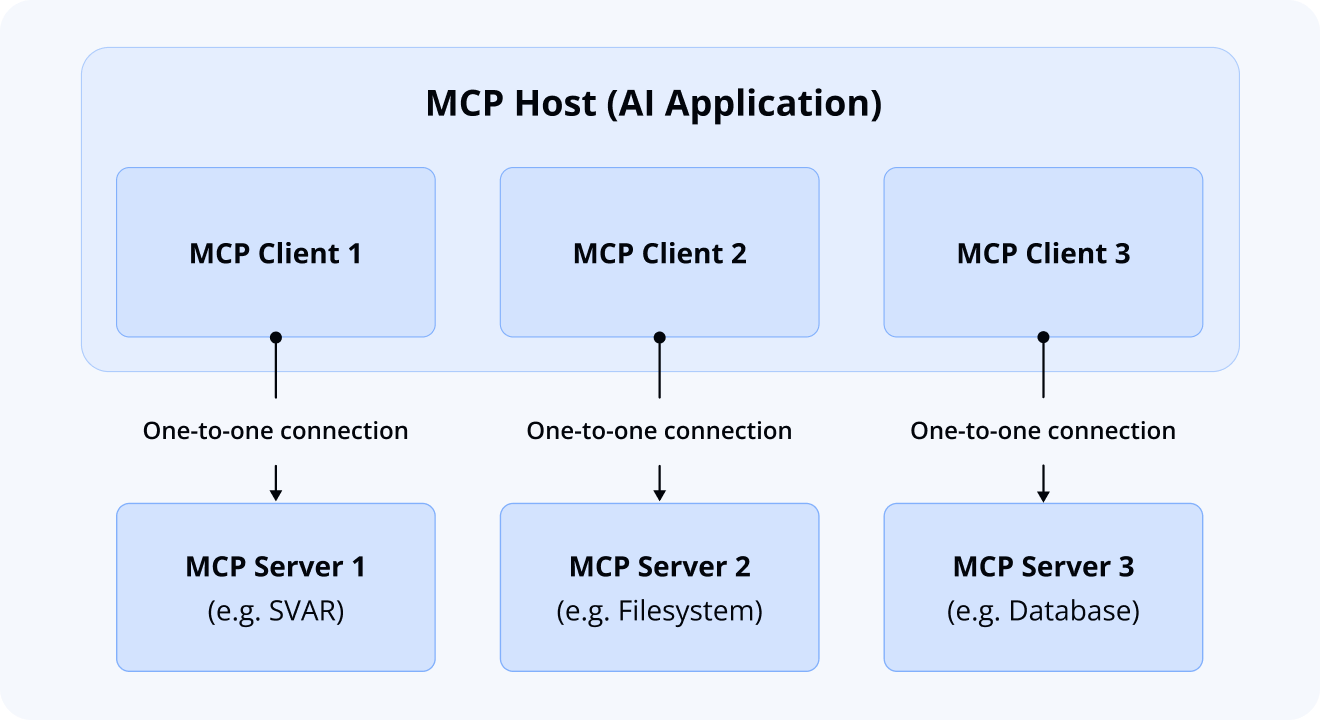
Actually, there are three core participants in the MCP architecture:
- MCP Hosts: AI environments that coordinate and manage the overall system (like Cursor IDE, Claude Code, Gemini CLI, Antigravity, or VS Code)
- MCP Clients: Consuming components that receive context from servers
- MCP Servers: Producing components that provide context and data
Here’s an example of how they work together: a popular AI coding tool like Cursor IDE acts as an MCP Host. When Cursor connects to an MCP Server (such as our SVAR React Gantt server, which we’ll discuss later), Cursor creates a dedicated MCP Client to maintain that connection.
When Cursor subsequently connects to another MCP Server (say, your local filesystem server), it creates an additional MCP Client for that connection. This maintains a one-to-one relationship: each MCP Server gets its own MCP Client, allowing the AI to seamlessly access multiple data sources simultaneously.
MCP Primitives: The Communication Language
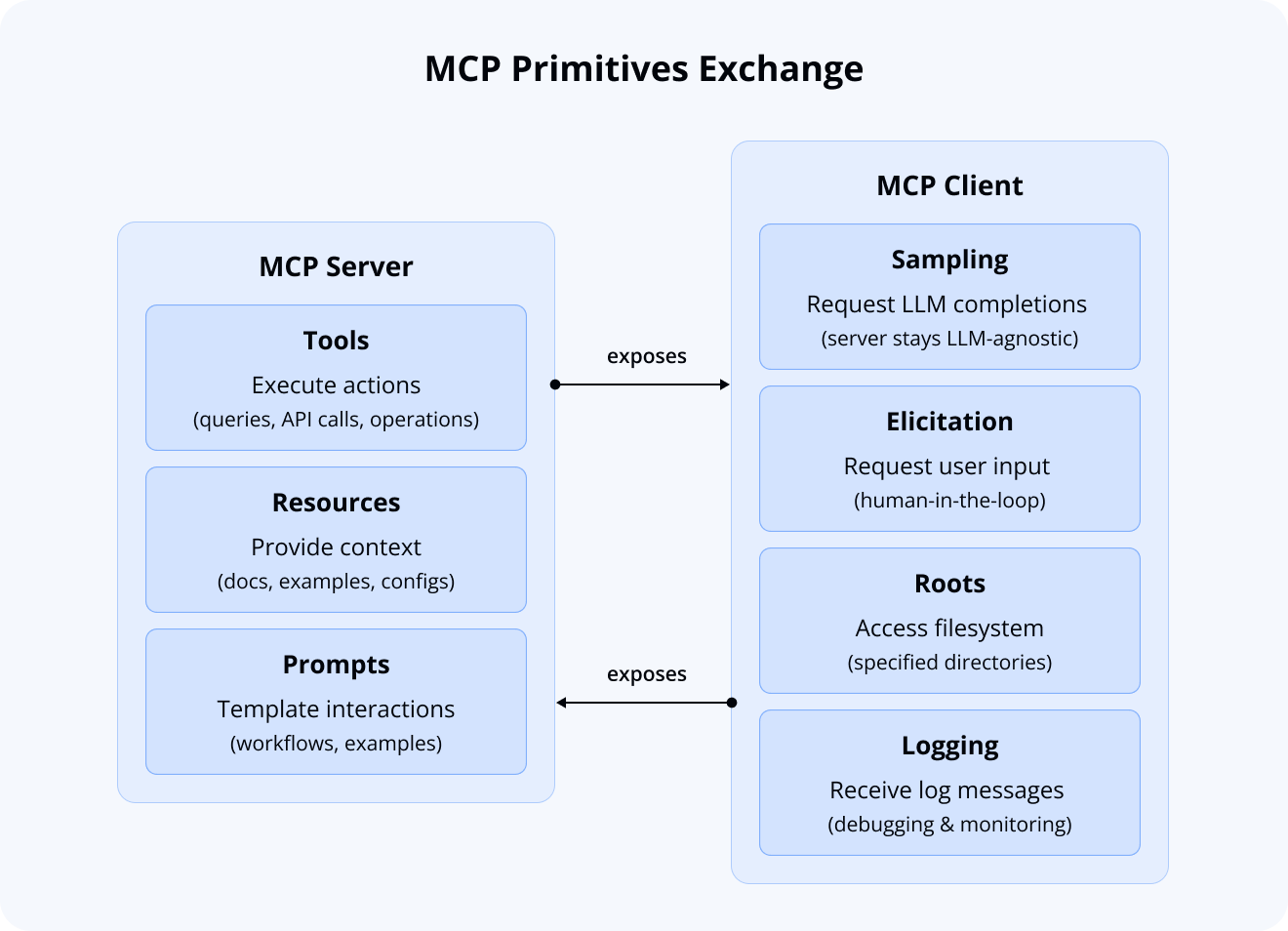
Now that the main actors of MCP architecture are clear, the next question is: how do they communicate with each other? This is where the MCP primitives concept comes in. Think of them as the basic building blocks or capabilities that servers and clients can offer to each other.
Both servers and clients define their own primitives that they can exchange, creating a standardized interface for communication.
MCP Servers expose three core primitives:
- Tools: Executable functions that can be invoked to perform actions (e.g., database queries, API calls, or filesystem operations)
- Resources: Data entities that provide contextual information (e.g., documentation pages, code examples, or configuration files)
- Prompts: Reusable templates that streamline interactions with the AI (e.g., system prompts, common workflows, or few-shot examples)
MCP Clients expose four core primitives that servers can use:
- Sampling: The server can ask the client to run an LLM query. This means our SVAR server doesn’t need its own AI model—it can use whatever LLM you’ve configured.
- Elicitation: The server can ask you questions directly, enabling true human-in-the-loop interactions. For instance, it might ask “Are you using TypeScript?” to provide more relevant examples.
- Roots: The server can access specific folders in your project. This lets it understand your project structure and provide contextual help based on your actual code.
- Logging: The server can send debug information to your IDE’s console, helping you understand what’s happening behind the scenes.
Understanding MCP primitives is crucial, but there’s another key concept that underpins how our MCP server actually delivers relevant information to the AI: Retrieval-Augmented Generation. Let’s explore how RAG works and why it’s essential for keeping AI responses accurate and up-to-date.
What’s The Concept of RAG?
In general, Retrieval-Augmented Generation (RAG) is a technique that gives LLMs context extending far beyond their static training data. Instead of relying solely on what the model learned during training, RAG injects external knowledge in real-time, enabling the model to work with current, up-to-date data.
This is critical in fast-moving environments—from software documentation to legal and medical fields. RAG allows you to reflect yesterday’s changes without retraining the model. It also grounds responses in factual sources and reduces hallucinations in sensitive domains where accuracy is crucially important.
MCP defines how AI tools talk to external systems. RAG defines what knowledge they receive and how it’s selected.
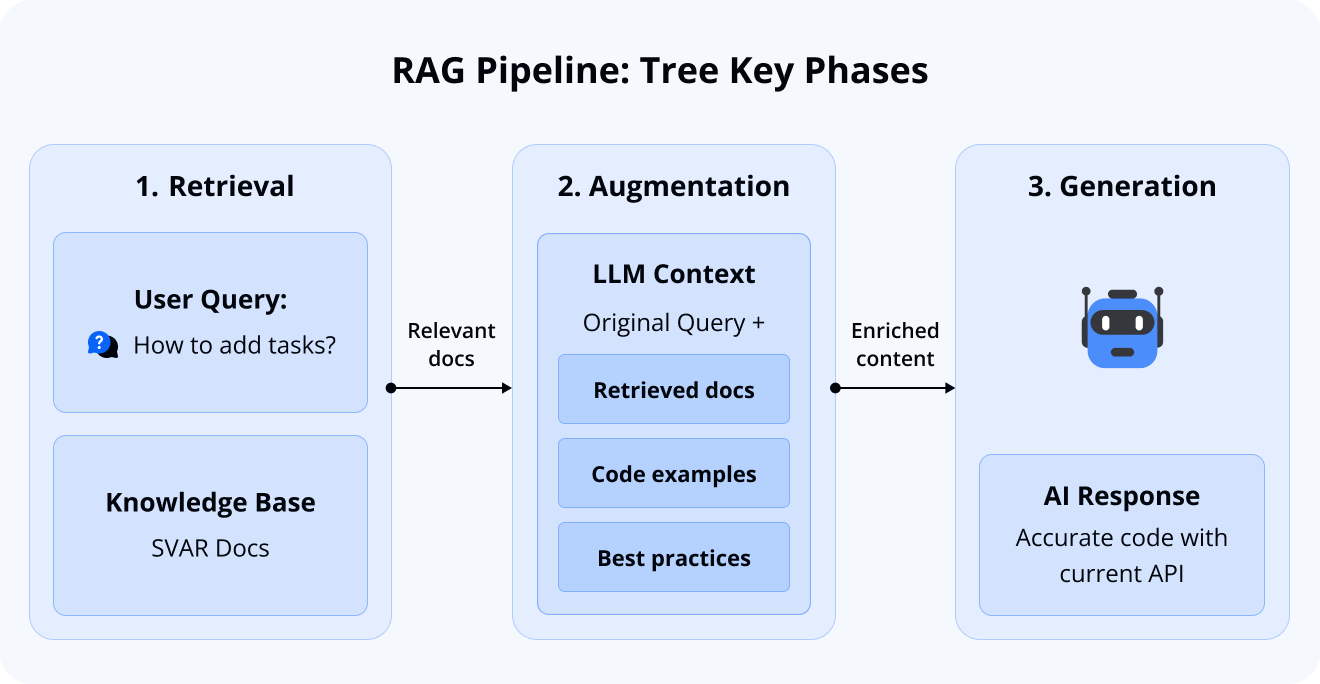
The concept is clear, so let’s break it down. RAG operates through three key phases:
- Retrieving: Searching relevant knowledge bases for pertinent information
- Augmentation: Injecting the retrieved information into the LLM’s context window
- Generation: Producing the final response based on the augmented context
You might think that’s all, although in fact modern RAG has transformed into a full-fledged paradigm responsible for providing knowledge straight to LLM.
Modern branches such as Cache-Augmented Generation (CAG) or Reasoning-Augmented Generation (ReAG) allow to expand this foundation, accounting for both short- and long-term context changes while enabling sophisticated agentic behavior.
How Our Solution Combines MCP and RAG
Our implementation demonstrates how MCP and RAG can work together in a unified workflow that bridges static LLM capabilities with constantly updated SVAR documentation.
RAG serves as the context engine, powering an AI system that retrieves the most relevant, up-to-date excerpts from our documentation. This allows you to ask questions about the latest releases, access verified code samples, and discover the best practices we recommend.
MCP serves as the connector, providing a standardized interface between your AI tool and our RAG system. This ensures seamless, real-time access to SVAR knowledge directly within your development environment.
From a technical perspective, our implementation uses:
- LlamaIndex for the RAG pipeline: document ingestion, embedding generation, vector store management, and entire pipeline orchestration
- FastMCP for the MCP server layer: handles protocol compliance, request routing, and primitive exposure (standardized communication between the AI tool and the RAG system)
Why these? Because they’re lightweight, elegant and get the job done without unnecessary complexity. Instead of wrestling with heavyweight stacks, you can spin up a RAG pipeline and an MCP server in just a few lines of code. See yourself:
import llama_index.coreimport fastmcp
reader = llama_index.core.SimpleDirectoryReader(input_dir = "path/to/your/documents", recursive = True)documents = reader.load_data()
index = llama_index.core.VectorStoreIndex.from_documents(documents)engine = index.as_query_engine()
server = fastmcp.FastMCP()
@server.tool(name = "inference")def inference(question: str) -> str:
  answer = engine.query(question)  return answer.response
if __name__ == "__main__":
    server.run()
Just configure your LLM-provider and that’s all it takes to create the most basic RAG-MCP server even for your personal documents. A few lines, a clear separation of concerns, and suddenly your AI agent can serve fresh, verified context straight from your docs.
This stack allows us to iterate on retrieval quality independently from the MCP integration.
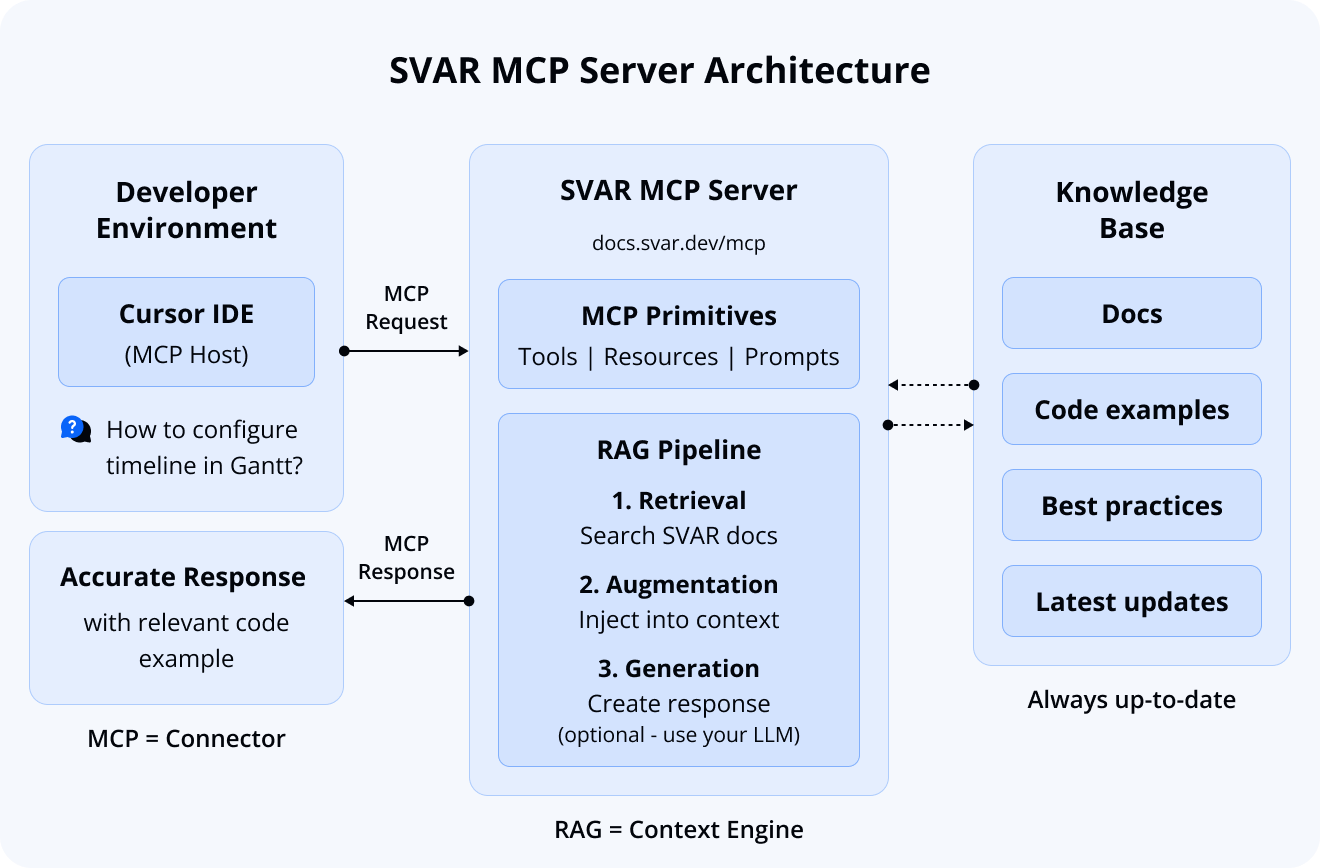
What Our MCP Server Provides
Now that we understand how MCP and RAG work together, let’s look at what our SVAR MCP server actually offers developers. Our implementation follows the MCP specification by exposing three types of primitives: Tools for executable operations, Resources for documentation access, and Prompts for common workflows.
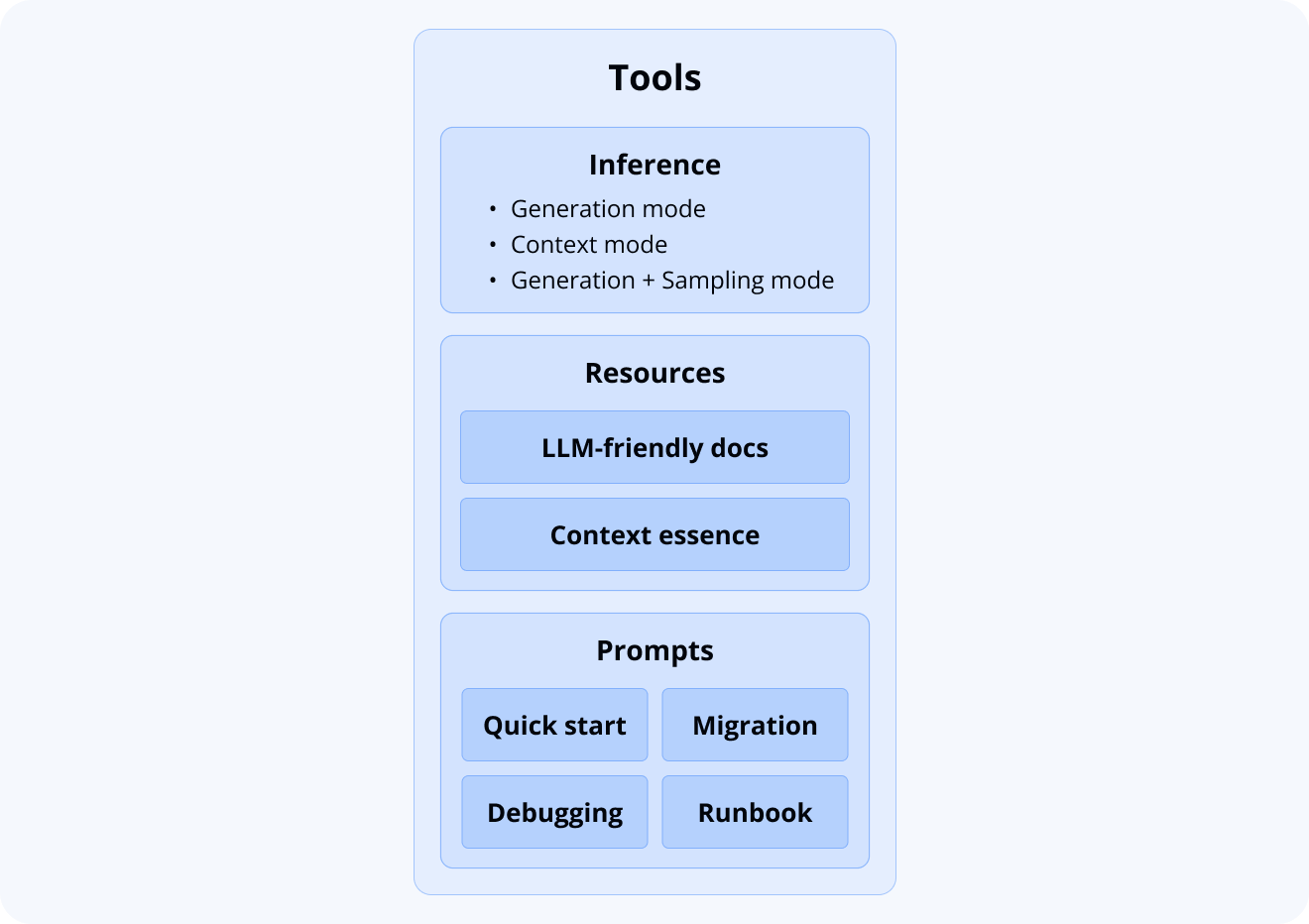
Tools: Flexible Inference Options
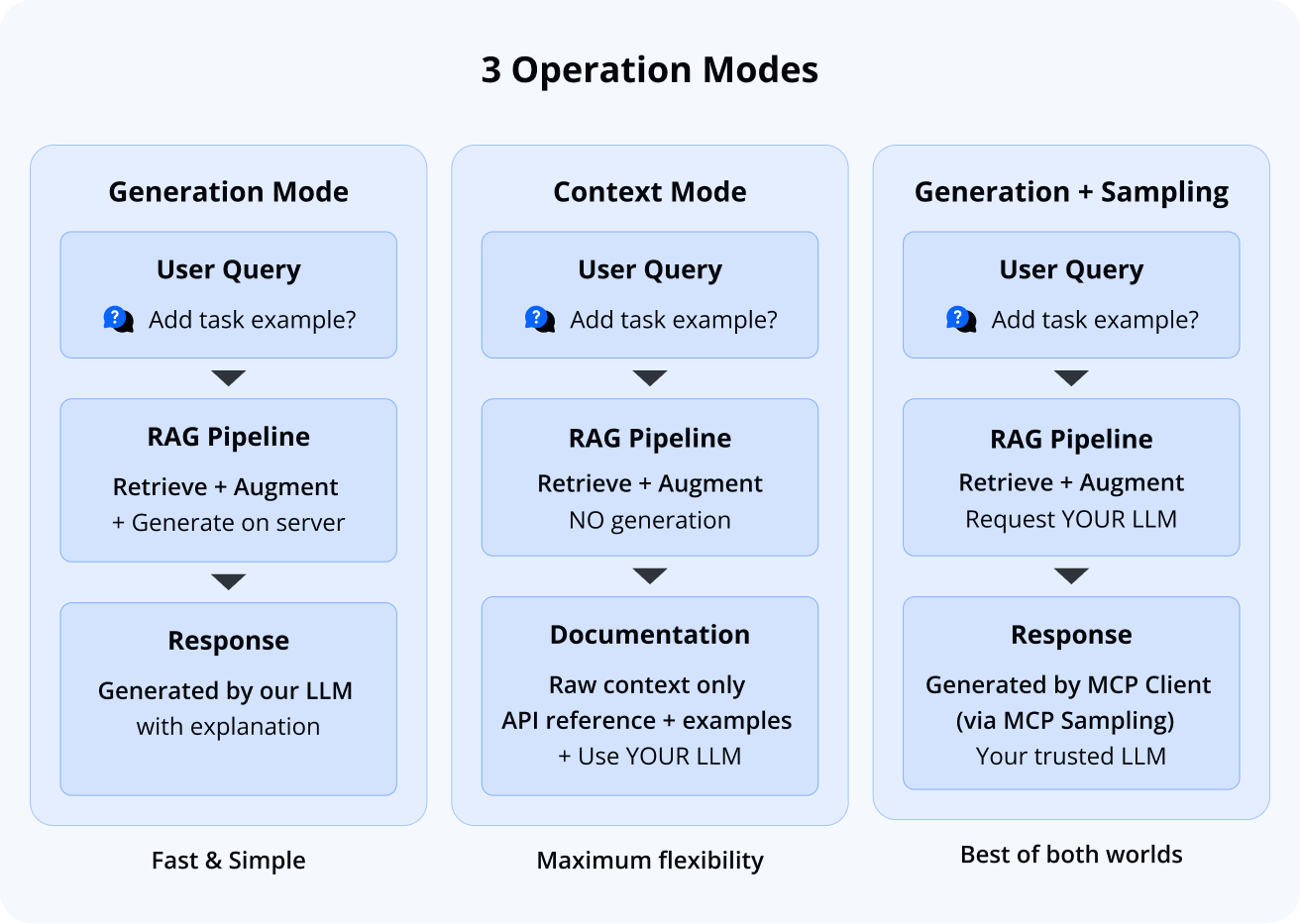
Our primary offering is a flexible inference tool with the following operation modes:
- Generation mode: Request information from our system and receive AI-generated responses powered by our RAG pipeline
- Context mode: Retrieve verified, relevant documentation excerpts without generation, allowing you to use your own preferred LLM
- Generation with MCP sampling: Use your own trusted model through the MCP sampling primitive (if your MCP Host supports it)
While we provide generation capabilities, our primary goal is delivering accurate excerpts from SVAR documentation. We intentionally don’t use SOTA-models for generation, instead focusing on retrieval quality and giving you flexibility to use the LLM you trust.
Resources: Documentation at Your Fingertips
We expose two key documentation resources:
- Full documentation: Complete SVAR documentation with LLM-friendly, token-efficient formatting. While too large to fit in most context windows, it’s valuable for LLM crawlers and direct browsing within your MCP Host.
- Essential context: A carefully curated subset of documentation compiled within context window constraints, providing your AI agent with a comprehensive overview of SVAR capabilities.
In fact, the full documentation itself is provided in llms.txt-like formatting. This file is not a separate resource but rather the canonical, cleaned version of the entire SVAR documentation. By pausing here, it’s worth emphasizing why this matters:
- Noise reduction: removing boilerplate, navigation fragments, and irrelevant text ensures that LLMs focus only on meaningful content.
- Token efficiency: A streamlined corpus reduces wasted tokens and improves generation speed.
Note: The Essential context (context.md) is designed as a subset of the full documentation (llms.txt), optimized to fit within context windows. For React Gantt, however, the documentation is compact enough that both resources are nearly identical. As we expand to larger SVAR components, context.md will become a more selective subset, while llms.txt will remain comprehensive.
Prompts: Ready-to-Use Templates
And as a nice bonus, we also provide a range of prompt templates you may find useful in general scenarios:
- Debugging and code review
- Quick start with our widgets
- Migration from one version to another
With icing on the cake - explicit MCP Server structure description (runbook) for scenarios where this is necessary.
Getting Started with SVAR MCP
Our MCP server is hosted at https://docs.svar.dev/mcp and integrates with popular AI coding tools including Cursor, Claude Desktop, Claude Code, and others.
It’s fully managed (no local setup required) and handles all the complexity of RAG retrieval and documentation formatting behind the scenes. Find the installation instructions in the docs.
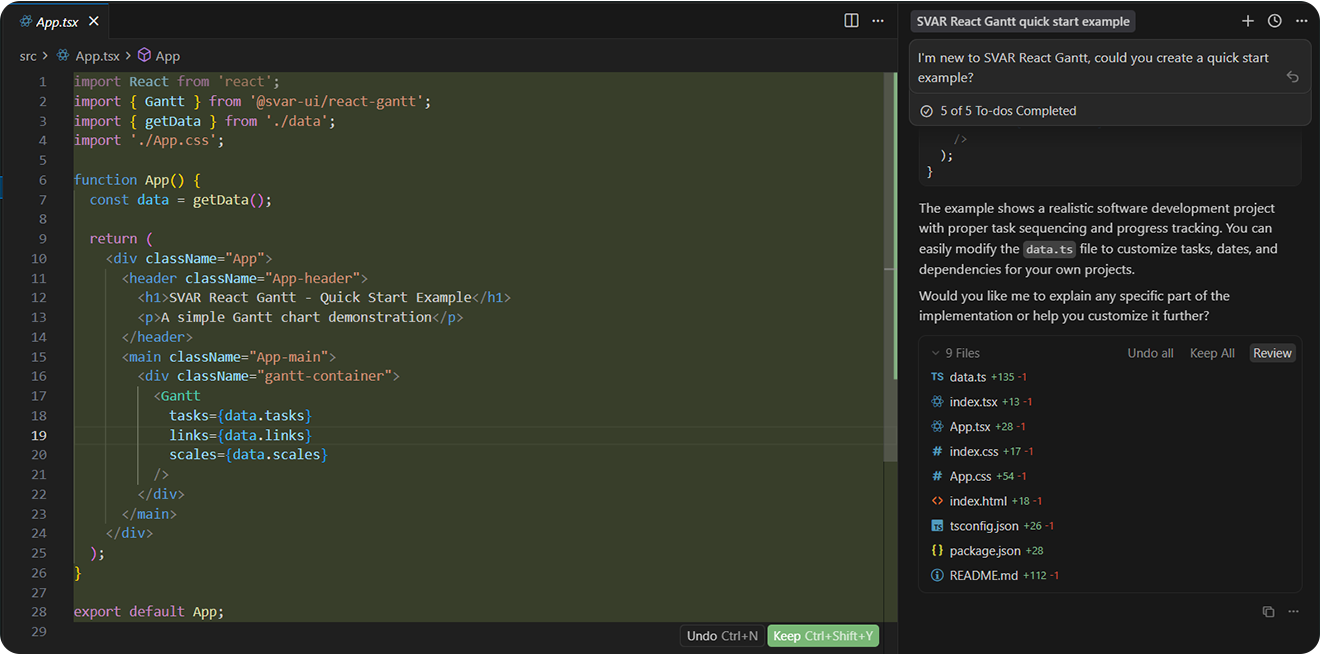
After connecting to the SVAR React Gantt MCP server, here’s what Cursor gives you in response to: “I’m new to SVAR React Gantt, could you create a quick start example?”
Key Takeaways for Building Your Own RAG-MCP Solution
While this article is based on SVAR React Gantt, the following takeaways apply to anyone building an MCP server for their own product or documentation.
When it comes to delivering intelligent, context-aware assistance through an MCP server, success hinges on more than just code. It’s about how you prepare your knowledge base, how you retrieve it, and how you empower users to trust the output.
Based on real-world implementation and iteration, here are three battle-tested pillars for building a performant, scalable, and trustworthy MCP server:
Start with Your Docs - Not Your Code
Before writing any code, invest time in structuring and verifying your documentation:
- Ensure your documentation reflects the latest product version. Outdated specs, deprecated APIs, or legacy workflows act like “context pollution”—silently degrading your LLM’s accuracy and confidence.
- Remove redundant, generic, or irrelevant content. Every extra paragraph dilutes the signal-to-noise ratio. Aim for precision, not volume.
- Test token usage early. Design chunking strategies before ingestion—balancing completeness with LLM context limits (e.g., 128K, 200K, or 1M tokens). Avoid silent truncation; design for graceful fit.
Choose Your RAG Stack Carefully
Retrieval-Augmented Generation (RAG) is the engine behind reliable MCP servers, but not all RAG pipelines are created equal. Here’s what you should consider:
- Embedding Model: Match dimensionality to scale. For small docs – 384D may suffice; for enterprise-scale knowledge – consider 768D–1024D models (e.g., text-embedding-3-large, gte-large, or fine-tuned options) for richer semantic separation.
- Chunking Strategy: Avoid extremes. Whole-document chunks are too vague; per-sentence chunks are too fragmented. Aim for semantically representative units like sections or Q&A pairs.
- Two-Stage Retrieval: Maximize both speed and accuracy. First stage (fast one): vector search via cosine similarity over the full index to get top-k candidates. Second stage (precise one): cross-encoder reranking on top hits.
Offer “Context-Only” Mode - It’s Underrated
Not every user wants (or needs) your LLM to generate the final answer. Introducing context delivery mode unlocks surprising value:
- User Trust: Developers sometimes prefer plugging your verified context into their own LLM, especially when compliance, fine-tuning, or security policies are involved.
- Cost Efficiency: Skipping generation compute — serving lightweight context payloads — reduces your computational load and latency, especially in high-volume scenarios.
- Debuggability: When things go sideways, you can inspect exactly what context was sent. No more black-box generation mysteries.
Wrapping Up
Building the MCP server for SVAR React Gantt is a practical step toward giving developers faster, more reliable access to our documentation directly inside their AI-assisted workflows. Instead of relying on outdated model knowledge, your AI tools can pull accurate, current information whenever you need it.
With MCP integration, you get correct API signatures, verified examples, and responses grounded in our actual docs. When we release updates to React Gantt, your AI assistant reflects those changes immediately. This reduces context switching, avoids guesswork, and makes working with the component more predictable and efficient.